

Plerdy SERP Checker is for the moment before writing goes wrong.
You have a keyword. You have a draft idea. Maybe you even have a page live already. But Google is already showing you what it prefers, and ignoring that is how teams end up publishing content that looks fine in docs and underperforms in search.
This guide shows how to use Plerdy SERP Checker as a practical Google SERP checker and competitor SERP analysis workflow. Not theory. Not a giant lecture on SEO. Just the steps that help you analyze Google search results, compare the top 10 Google results, spot search intent, find keyword gaps, and build a content brief that is actually useful.
If you work in content, SEO, SaaS, ecommerce, or client delivery, that is the job here: get to the point faster, without opening ten competitor tabs and pretending that counts as analysis.
Why SERP Analysis Matters Before You Write Or Update a Page
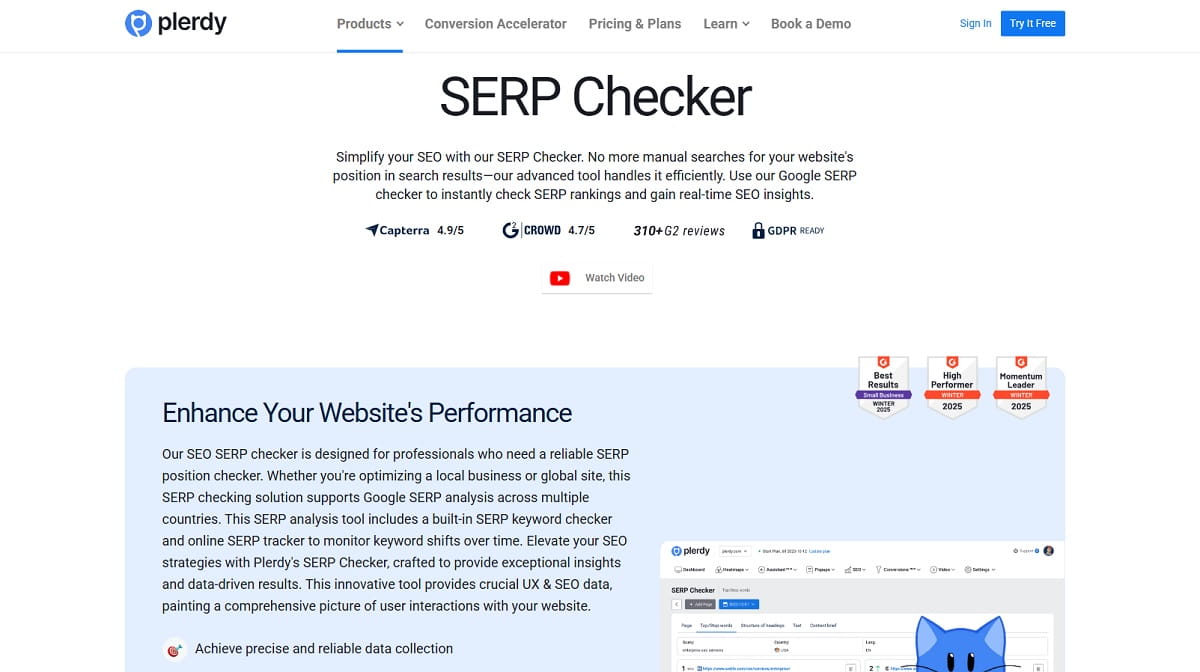
A lot of pages fail for a simple reason. The team writes what seems logical internally, while Google is rewarding a different format, a different angle, or a different depth level.
That is why SERP analysis matters. It lets you check what already ranks, what patterns repeat, and what is missing. A good SERP checker does not tell you to copy competitors. It helps you understand the shape of the result set so you can build something sharper.
With Plerdy SERP Checker, you can run a fast Google search analysis workflow around a keyword or competitor site, review the Top 10 ranking pages, inspect titles, descriptions, H1 content, headings, lists, image sections, and text patterns, then use those findings to make a page better structured and more aligned with search intent.
That matters in three situations especially:
- When you are planning a new article and need to know what Google already rewards.
- When an older page ranks, but not high enough, and you need a cleaner update plan.
- When two pages on your own site are drifting into keyword overlap and you need a clearer content brief.
Step By Step: How To Use Plerdy SERP Checker
Step 1: Open Plerdy SERP Checker
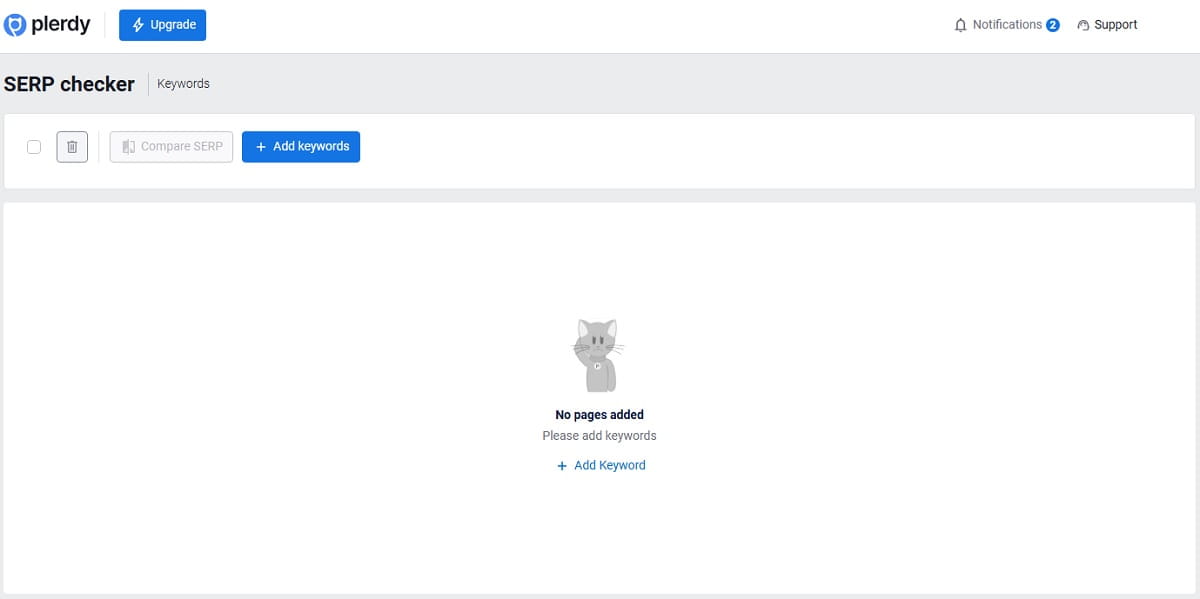
Start inside Plerdy SERP Checker. The point here is speed. You are not trying to build a full SEO report first. You are trying to get a clean read on the current SERP.
Use it when you have one of these starting points:
- A primary keyword you want to target.
- A page that already exists and needs stronger rankings.
- A competitor URL or competitor topic you want to reverse engineer.
Do not open the tool with a vague topic like “marketing” or “crm.” Pick a real search phrase with a clear page goal behind it. The more specific the query, the more useful the SERP analysis becomes.
Step 2: Enter the Target Keyword
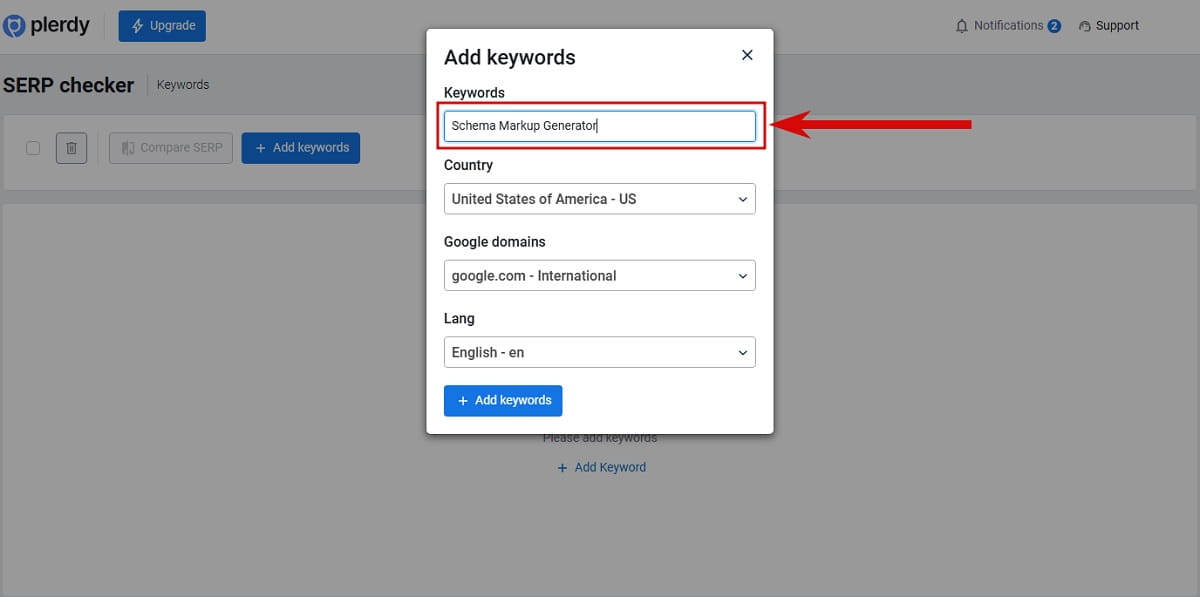
Add the exact keyword you want to test. This is the anchor for the whole workflow.
If your future page is supposed to rank for “best email outreach software,” start there. Not with a broad parent topic. Not with five keywords at once. One query first. Clean input, cleaner decisions.
This matters because a SERP keyword checker is only useful when the keyword reflects the page you truly want to build. If you feed the tool a term with mixed intent, the output will look messy. That is not a tool problem. That is a targeting problem.
Step 3: Choose the Right Country, Language, and Google Region
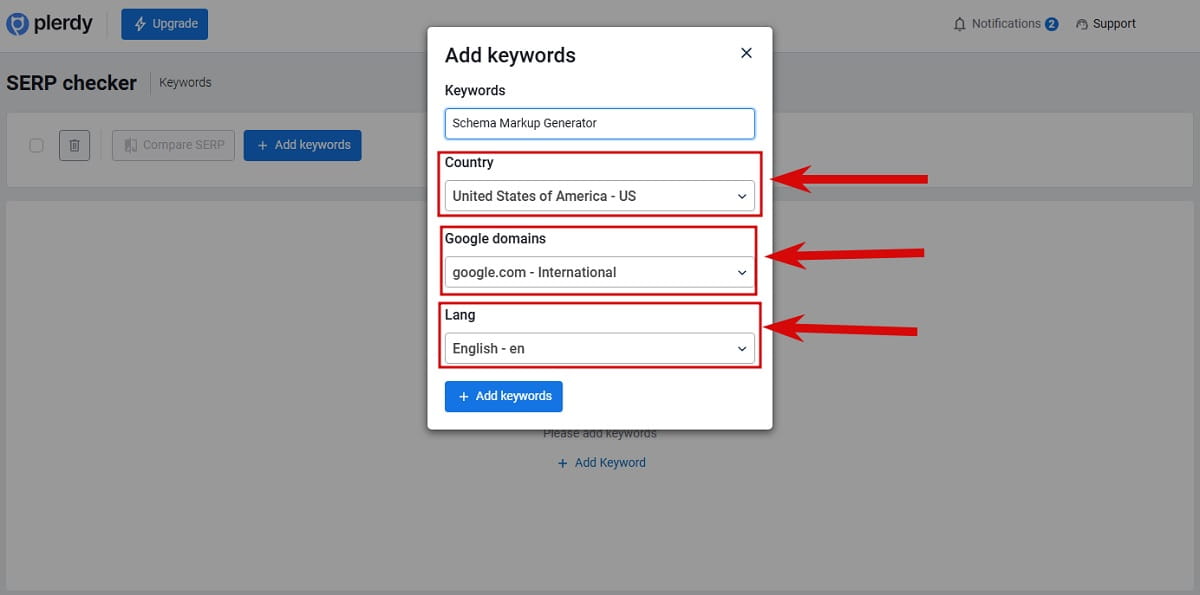
This step gets skipped more than it should.
Choose the target country, language, and Google region that match your actual market. A U.S. page should be checked in U.S. conditions. A page for Spain should not be analyzed through a U.S. lens and then blamed for poor performance later.
Why this matters is obvious once you see it in the wild: Google does not show identical results everywhere. Local intent, language nuance, and regional competition change the top-ranking pages. So if your page is for U.S. buyers, use U.S. settings. If you are targeting English users in Canada, use that setup instead.
Mistake to avoid: picking the wrong region just because the broader keyword looks easier there. That gives you a false brief and a false sense of competition.
Step 4: Review the Top 10 Ranking Pages
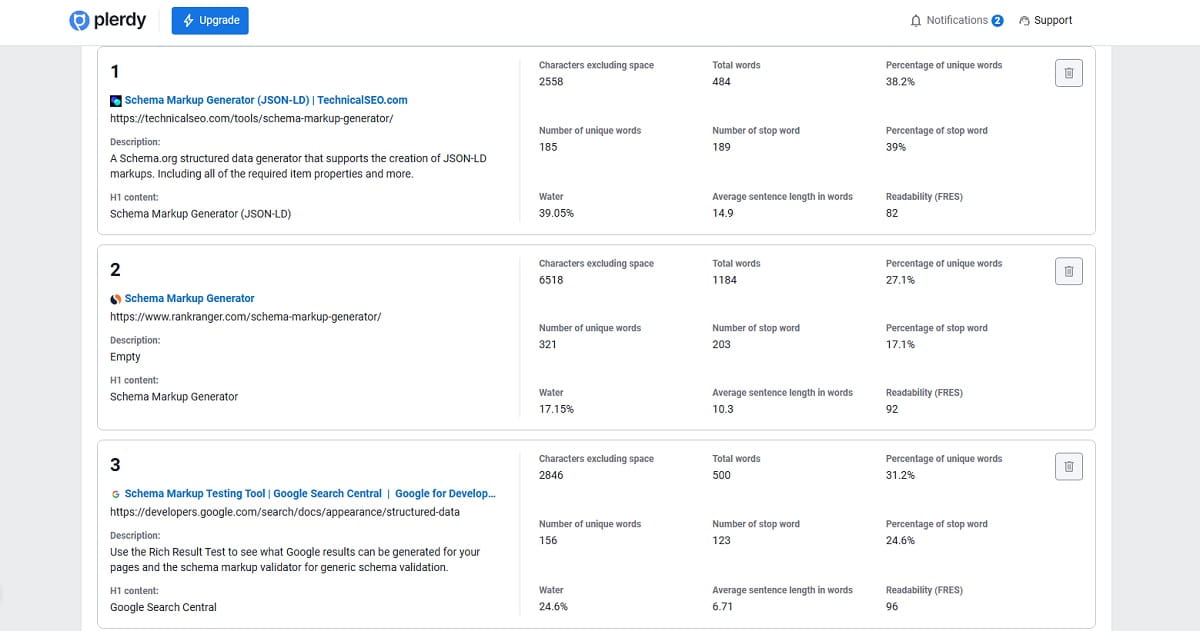
Now look at the Top 10 Google results. This is where Plerdy starts saving time.
Instead of opening every ranking page one by one and trying to remember what each one looked like, you can compare the competitor set in one place. That is the real advantage of a SERP checker: not just seeing who ranks, but seeing them in a format that helps you make decisions.
At this stage, focus on the shape of the result set:
- Are the top results blog posts, landing pages, category pages, or homepages?
- Are the titles written like tutorials, comparisons, definitions, or commercial pages?
- Do the same brands appear again and again?
- Does the SERP look stable, or are new pages entering often?
You are not collecting trivia. You are checking what kind of page Google appears to want for this query.
Step 5: Inspect Titles, Descriptions, URLs, and H1 Content
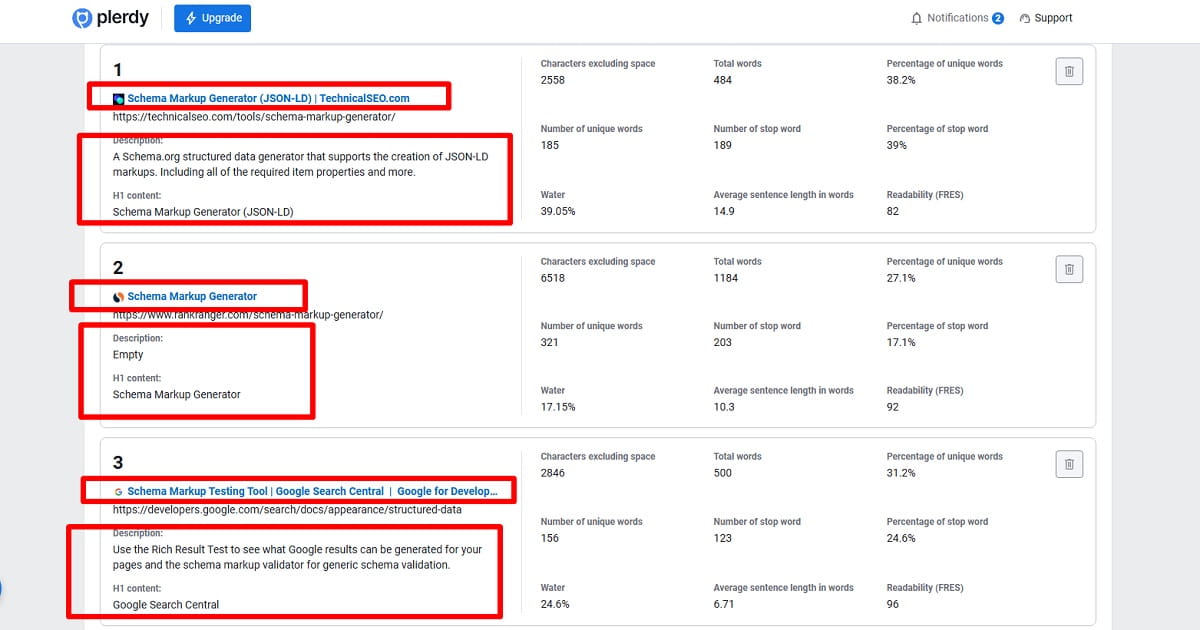
Once the Top 10 is visible, move to the basic page signals first: titles, meta descriptions, URLs, and H1 content.
This part is simple, but it tells you a lot. If most ranking pages use “best,” “guide,” “pricing,” “examples,” or “template” in their titles, that tells you what framing Google is already surfacing. If your planned title pushes in a completely different direction, you should have a reason.
Look for patterns like these:
- Repeated modifier words in titles.
- Common angles in meta descriptions.
- Whether URLs are short and focused or nested in broader blog structures.
- Whether H1s match the exact keyword or use close variants.
Plerdy SERP Checker helps here because you can inspect competitor page structure without manually visiting every result. That sounds small. It is not. It removes the annoying part of competitor SERP analysis and leaves more time for actual thinking.
Step 6: Compare Heading Structure, Lists, and Image Sections
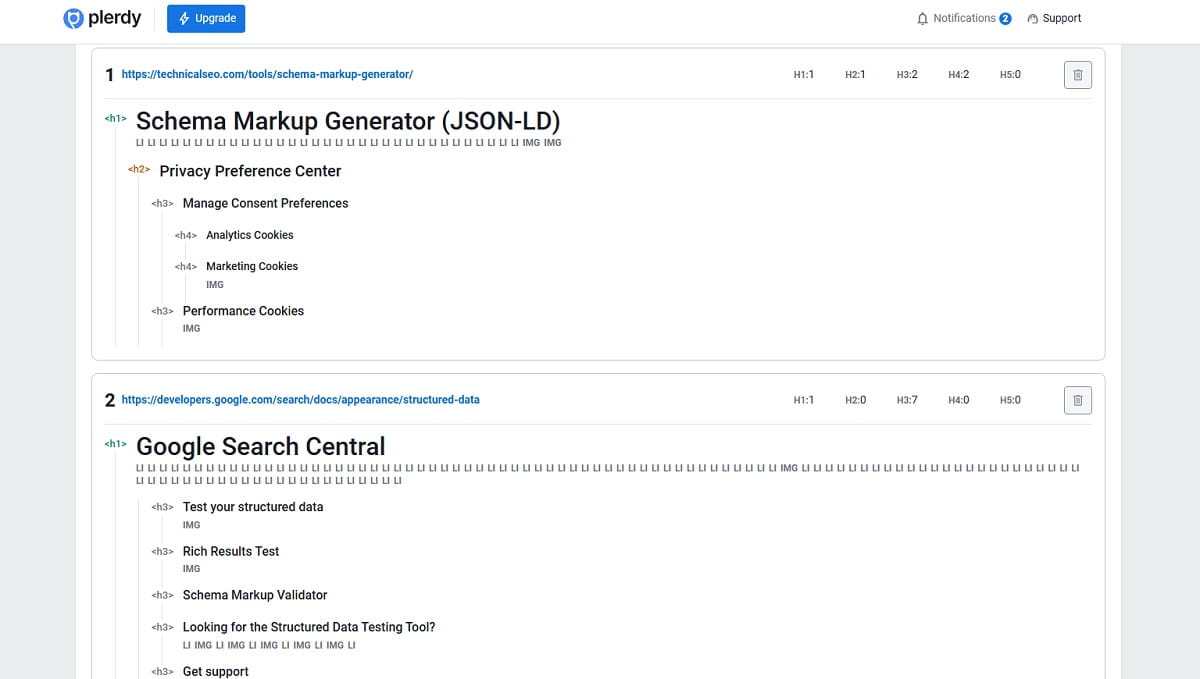
Next, move past the title layer and study the page skeleton.
Check the heading structure. See how competitors organize H2s and H3s. Look for lists, comparison blocks, feature sections, examples, FAQs, image-heavy areas, and repeated subtopics. You are trying to understand how the top pages earn readability and coverage.
That is usually where weak content gets exposed. Many pages talk about the right topic but organize it badly. They bury useful comparisons, skip obvious subtopics, or answer the main question too late. A strong SERP competitor analysis catches that fast.
Questions to ask while reviewing competitor content structure:
- What sections appear on almost every ranking page?
- What sections appear only on the strongest pages?
- Are lists used because the topic naturally needs scannability?
- Do image sections support the topic, or are they filler?
- Is the page built for beginners, experts, or buyers close to a decision?
If you see the same section across six or seven competitors, that section is probably not optional.
Step 7: Review Word Count, Character Count, Unique Words, and Stop Words
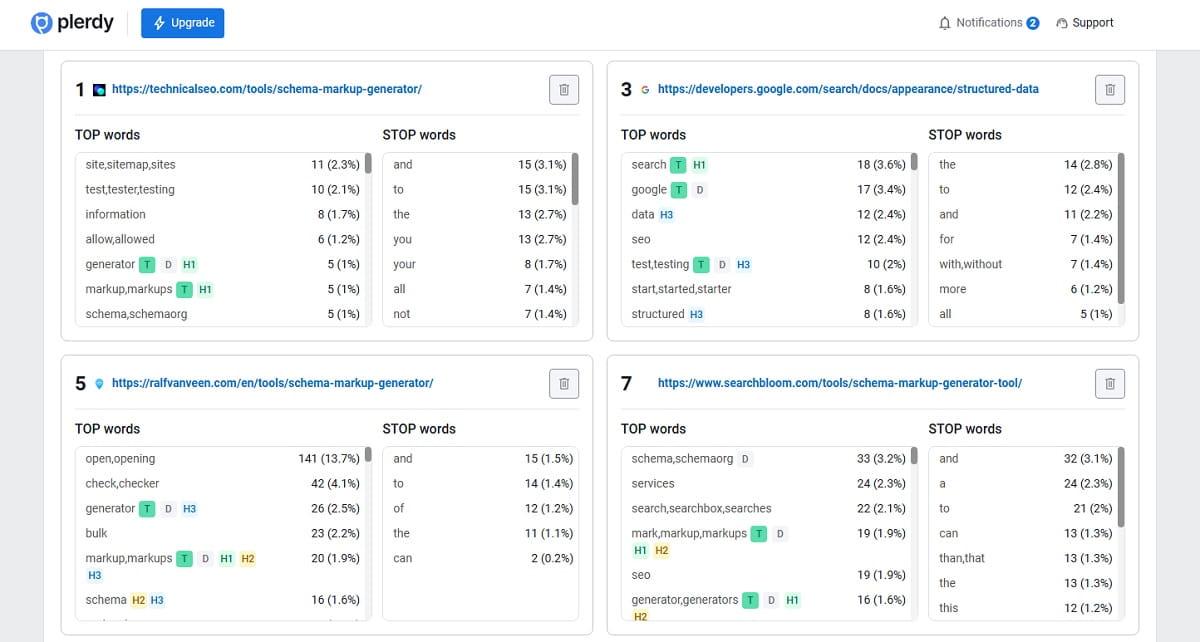
Now get into the content metrics.
Plerdy SERP Checker highlights character count, word count, unique words, and stop words. This is where the tool shifts from simple SERP position checker behavior into something more useful for content planning.
Word count matters, but only in context. Do not treat the longest page as the winner by default. A 4,000-word article can still be bloated. What you want is the range that appears normal for the SERP. If most top-ranking pages are between 1,600 and 2,200 words and your draft is 700, that is a clue. If your draft is 4,500 words and says the same thing three times, that is also a clue.
Unique words help you judge lexical variety. That matters when pages are too repetitive or thin. Stop word analysis is useful for a different reason: it helps you clean up noise. Some pages rank despite messy copy. That does not mean the mess is a strength.
Look at Top and Stop word patterns in titles, descriptions, and headers. This helps you see which terms appear repeatedly in winning pages and which filler language clogs weaker ones.
Mistake to avoid: using these metrics like rigid targets. They are directional signals, not commandments.
Step 8: Identify Repeated Themes and Missing Subtopics
This is where real value starts.
After reviewing the Top 10 Google results, ask a harder question: what do competitors repeatedly cover that your page does not? That is the core of keyword gap analysis and search intent analysis in practice.
For example, if nearly every page ranking for a query includes pricing, use cases, pros and cons, setup steps, and a FAQ, while your draft only offers a broad overview, the gap is obvious. The issue is not just missing keywords. It is missing usefulness.
You are looking for three types of gaps:
- Topical gaps: subtopics competitors cover and your page ignores.
- Structural gaps: competitor sections are clearer, easier to scan, or better ordered.
- Intent gaps: your page answers a different question than the one Google seems to reward.
That last one hurts the most. You can have solid writing and still lose because the page format is wrong for the query.
Step 9: Build a Cleaner Content Brief
Once the patterns are clear, turn them into a content brief.
Do not dump raw SERP notes into a doc and call it strategy. Build something usable for a writer, editor, SEO, or client.
A strong content brief from Plerdy SERP Checker should include:
- The target keyword and market settings used for analysis.
- The apparent search intent behind the current result set.
- The dominant page type in the SERP.
- Repeated title and heading patterns.
- Important subtopics that show up across competitors.
- Gaps your page should fill better than existing results.
- Suggested H2 and H3 structure.
- Notes on length, list usage, FAQ need, and comparison framing.
Plerdy also supports content brief creation as part of the workflow, which makes this step easier when you need to move from analysis into production without losing the logic behind the decisions.
This is also the moment to share findings with SEO colleagues, copywriters, or clients. That sounds operational, maybe boring, but it matters. A brief that comes from real SERP competitor analysis is easier to defend than one built from gut feeling.
Step 10: Write the Page to Match Intent Better Than the Current Results
Now write.
Not by cloning the SERP. By understanding it well enough to improve on it.
If the query is clearly informational, do not force a sales-heavy landing page. If the SERP favors comparison content, do not write a vague “what is” article. If the ranking pages are all beginner-friendly explainers, a dense expert-only piece may miss the mark.
Use what you found to make better choices:
- Answer the core query earlier.
- Use headings that reflect real user expectations.
- Add missing subtopics with actual substance.
- Trim filler where competitors are already overexplaining.
- Make the page easier to scan with lists, comparisons, or examples where they genuinely help.
The goal is not “more content.” The goal is a page that matches Google’s apparent intent and serves the user more cleanly than the current ranking set.
Step 11: Re-Check the SERP Later
SERP analysis is not a one-time ritual.
Re-check the SERP after publishing or updating the page. Use Plerdy as a SERP tracker and SERP position checker to monitor ranking shifts, new entries, and changes in the competitor set.
This is especially important for queries where rankings move often. Sometimes your page does not need a rewrite. It just needs you to notice that the SERP changed and new competitors brought a better structure or a fresher angle.
If the results are stable, monthly checks may be enough. If the keyword is commercially important or volatile, check more often.
How To Read the Top 10 Competitor Data Without Misusing It
The Top 10 table is useful, but only if you read it with context.
Three things matter most:
- Consistency: If the same subtopics and formats repeat, that is a signal.
- Outliers: If one page ranks with a very different structure, figure out why before copying it.
- Practical averages: Use content metrics to understand the normal range, not to chase perfect symmetry.
Sometimes people overreact to one strong competitor and ignore the broader pattern. That is a mistake. SERP analysis works best when you read the whole result set, not your favorite brand in position two.
How To Compare Titles, Meta Descriptions, H1s, Headings, and Text Signals
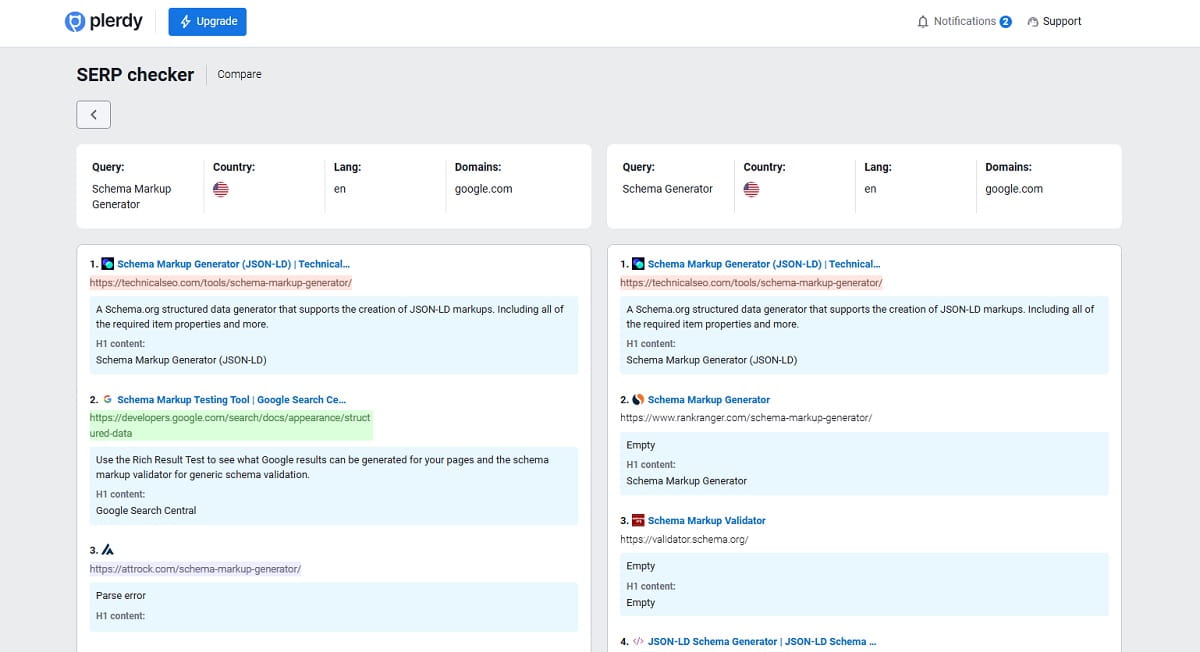
If you want a fast comparison workflow, move in this order:
- Titles and meta descriptions for promise and framing.
- H1s for topical focus.
- H2 and H3 structure for coverage and flow.
- Lists and image sections for scannability and support.
- Word count, unique words, and stop words for content quality signals.
This order works because it moves from visible search-facing elements into deeper on-page structure. It also prevents a common trap: spending too much time on word count before you understand intent or format.
Titles and meta analysis should answer one question: what promise is being made in the SERP?
Heading analysis should answer another: how do top pages deliver on that promise once users click?
Text metrics then help you judge whether your draft is underbuilt, overbuilt, repetitive, or thin.
How To Spot Search Intent, Keyword Gaps, and Structure Patterns
Search intent analysis sounds abstract until you reduce it to visible clues.
Look at what the top pages are trying to help the user do. Learn? Compare? Buy? Find a tool? Solve a specific problem quickly? Usually the SERP tells you, quietly but clearly.
Then look for wording patterns. Are pages using “best,” “how to,” “vs,” “examples,” “template,” “checklist,” or “pricing”? These are not magic words. They are clues about the problem Google thinks the query represents.
Finally, run keyword gap analysis with restraint. The best page is not the one that shoves in every related phrase. It is the one that covers the obvious and important subtopics in a natural order. Plerdy helps because it surfaces repeated terms and competitor themes quickly, so you can build a better article structure instead of stuffing a page full of disconnected keyword fragments.
How To Turn SERP Data Into a Better Article Or Landing Page
This is the step most teams rush, and it is the one that decides whether the research was worth doing.
Turn the data into decisions.
Maybe the SERP shows that all top pages explain setup steps before benefits. Then your draft should probably do the same. Maybe competitor pages all use comparison tables, but they barely explain edge cases. Then you have your opening: keep the comparison, add the nuance. Maybe the whole SERP is filled with fluffy intros. Great. Skip the fluff and answer earlier.
A better page usually comes from a few disciplined choices:
- Match the dominant intent.
- Keep the useful recurring sections.
- Drop unnecessary filler competitors keep repeating.
- Add missing examples, clearer steps, or sharper comparisons.
- Write with enough specificity that the page feels built for a real decision, not for a keyword spreadsheet.
That is how a SERP checker becomes more than a reporting tool. It becomes a planning tool.
When To Add Semrush as an Optional Extra Layer
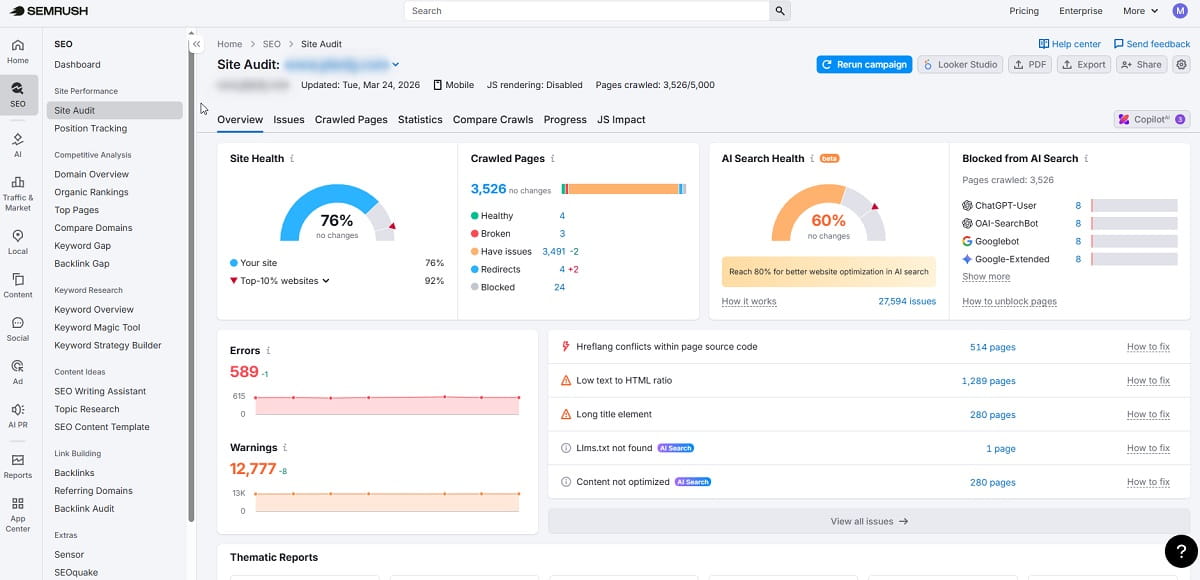
Plerdy SERP Checker covers the core workflow for SERP analysis, competitor content structure review, and content brief planning.
If you also use Semrush, add it later, not first.
Use Semrush when you need an extra layer around backlink strength or off-page comparison. That can help when the SERP is dominated by powerful domains and you want to know whether content improvements alone are realistic.
But keep the sequence straight. First understand the query, search intent, top 10 Google results, and competitor structure. Then validate backlink strength if needed. Too many teams do that backward.
Common Mistakes When Using a SERP Checker
- Choosing the wrong market settings. Country, language, and region are not cosmetic fields.
- Analyzing one competitor instead of the result set. One page can mislead you.
- Using word count as a target instead of a clue. Longer is not automatically better.
- Copying headings literally. Use patterns, not plagiarism.
- Ignoring intent mismatch. This is the quiet killer.
- Treating stop words and unique words like a scoring game. They are signals, not trophies.
- Skipping the re-check. A SERP tracker matters because competitors move, and so does Google.
Frequently Asked Questions About Plerdy SERP Checker
What Does Plerdy SERP Checker Do?
Plerdy SERP Checker helps you analyze Google search results for a target keyword or competitor site. You can choose the country, language, and Google region, review the top 10 ranking pages, inspect titles, descriptions, URLs, H1 content, and competitor structure, then compare content metrics such as word count, unique words, and stop words to build a stronger page.
How Is a SERP Checker Different From Rank Tracking?
A SERP checker helps you analyze the current search result set for a keyword so you can understand search intent, competitor pages, and content patterns. Rank tracking is more about monitoring where a page or domain appears over time. In practice, you usually need both: first analyze the SERP, then track how positions shift later.
How Do I Choose the Right Country and Language in Plerdy SERP Checker?
Choose the market that matches the audience you actually want to rank for. If your page targets U.S. users, use U.S. settings. If you are targeting another country or language, switch the setup before analyzing results. This matters because Google SERPs can change by region, language, and local intent.
What Should I Compare in the Top-Ranking Pages?
Start with titles, meta descriptions, URLs, and H1s. Then compare heading structure, lists, image sections, and repeated subtopics. After that, review word count, unique words, and stop words to understand the content range and quality patterns across the top results. The goal is to see how top pages are framed, structured, and written.
How Do Stop Words and Unique Words Help Content Optimization?
Unique words help you judge how varied and information-rich a page may be, while stop word analysis can reveal unnecessary filler or repetitive noise. These metrics should not be treated as hard targets. They are better used as signals that help you clean up weak copy, compare competitor patterns, and create more focused content.
Can I Use Plerdy SERP Checker for Competitor Analysis?
Yes. Plerdy SERP Checker is useful for competitor SERP analysis because it lets you compare top-ranking pages without opening every competitor site manually. You can inspect page structure, text patterns, H1 and heading usage, content metrics, and ranking shifts to understand what competitors are doing well and where your page can improve.
Do I Need Semrush Too?
Not always. Plerdy SERP Checker already covers the main workflow for SERP analysis, competitor content review, and content brief planning. If you also use Semrush, it can be helpful as an extra layer for backlink analysis or broader off-page evaluation. It works best as a secondary validation step, not as a replacement for reading the SERP properly.
How Often Should I Re-Check Google SERPs?
That depends on how competitive and volatile the keyword is. For important commercial pages, checking more often makes sense. For more stable informational topics, monthly reviews may be enough. The key is not to assume the SERP stays fixed. New competitors enter, rankings shift, and content expectations change.
Final Wrap-Up
If you use Plerdy SERP Checker the right way, it stops being just a SERP tracker or SERP position checker. It becomes a fast decision tool.
You enter a keyword. You set the right market. You review the top 10 Google results. You inspect titles, descriptions, H1s, headings, word counts, unique words, and stop words. You spot the repeated themes, the keyword gaps, and the intent patterns. Then you turn that into a cleaner content brief and a stronger page.
That is the whole job, really. Read the SERP carefully. Write with intent. Re-check later. And if you want a deeper walkthrough of the interface itself, use the Plerdy product video as the quick visual companion to this process.