

Most funnels do not fail because the business has no traffic. They fail because teams cannot see where the user journey actually breaks. One page leaks interest, another page creates hesitation, and the final drop-off gets blamed on “low intent” without much proof.
Plerdy Website Funnel Analysis gives that proof. It shows how people move from one page to the next, where they stop, and which step deserves a closer look with session recordings, click maps, scroll depth, hover behavior, and micro-events. Used well, it turns a vague conversion funnel into something you can actually improve.
What Plerdy Website Funnel Analysis Helps You See
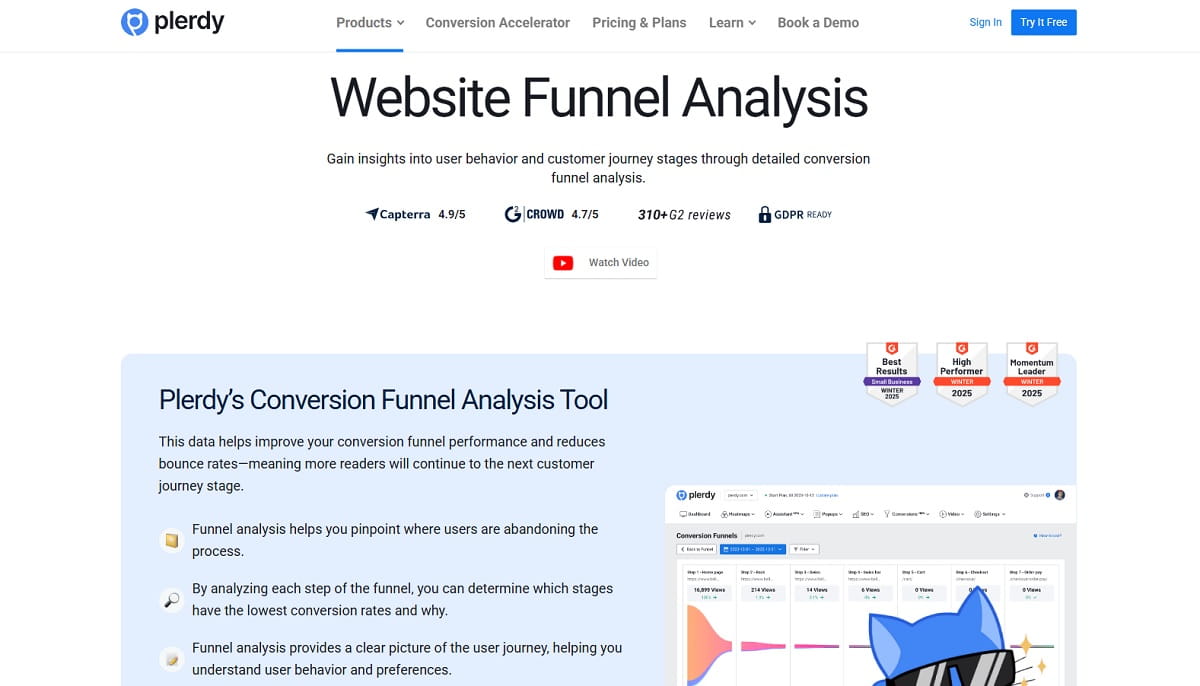
Plerdy Website Funnel Analysis is built to show the real path people take across your website conversion funnel. Not the path you hoped they would take. The path they actually follow.
That matters because conversion problems usually hide between steps. A landing page may attract traffic, but the next page might not feel relevant enough to continue. A product page may get attention, but the cart step may introduce friction. A service page may look clean, yet visitors still leave before they reach Contact Us. Funnel analysis exposes that gap.
In practice, Plerdy helps you:
- Track funnel steps across website pages
- See the percentage of users leaving on each step
- Identify the stage with the lowest conversion rate
- Understand where bounce rate and drop-off start to rise
- Connect weak steps with real user behavior and customer journey signals
That is why website funnel analysis is useful for ecommerce teams, SaaS marketers, growth managers, and service businesses. It does not just describe the sales funnel analysis problem in abstract terms. It shows where the user journey breaks inside the page flow you care about most.
How To Build Your First Funnel in Plerdy
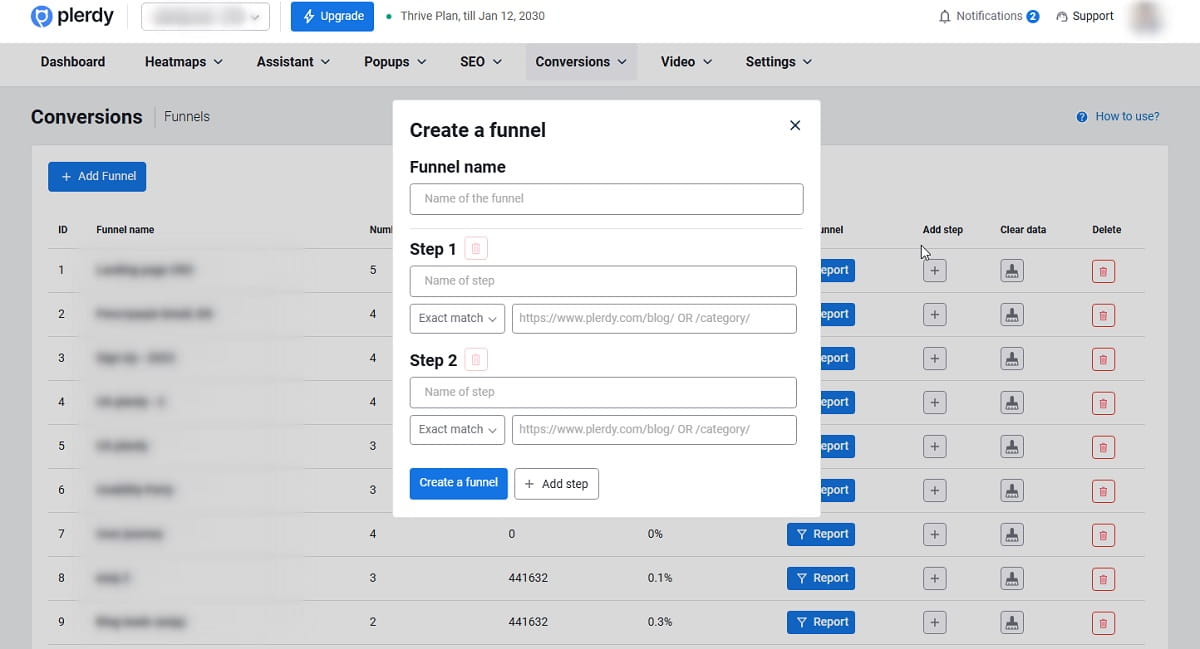
The first funnel should be simple. Clear path, clean logic, no mixed intent. That is where many teams get sloppy. They try to map half the website into one report and end up learning nothing useful.
Choose the First Page Correctly
Your first step should be the page where users land from traffic channels. This is the entrance to the website funnel analysis, so it needs to reflect the actual start of the journey you want to measure.
For an online store, that first step can be a category page. That makes sense when paid, organic, direct, or social traffic often lands there before users narrow their interest.
Do not start with a page that already sits in the middle of the flow unless that is the true entry point for the traffic segment you are reviewing. Funnel setup gets distorted fast when the first page is chosen for convenience instead of logic.
Add the Next Logical Step
The second page should be the page the potential customer is expected to visit next. This sounds obvious. It still gets messed up all the time.
If the first step is a category page, the second step is usually a product page or a narrower page that shows buying intent. The point is to reflect the next meaningful movement, not just any page that sometimes appears in analytics.
A good conversion funnel analysis depends on step sequence. If the second step is too broad, the funnel becomes noisy. If it is too narrow, you may exclude valid paths and misread the customer journey.
Add Product or Intent-Matching Pages
You can optionally add a third step when the journey needs another stage before conversion. A common ecommerce example is grouping product pages by a shared URL segment such as “product.”
This is where partial URL logic becomes useful. Instead of forcing one exact page, you can include pages that match the same pattern and represent the same intent stage. That keeps the website conversion funnel practical instead of overly rigid.
The same logic works in SaaS and service funnels too. You are not just tracking pages. You are tracking intent moving forward.
Add the Final Conversion Page
The last step should be the actual conversion page. In many cases, that is the Thank You page.
This matters more than people admit. If you end the funnel on a page that only suggests progress, not completion, your funnel analysis tool will show a partial story. The final step needs to reflect the finished action: purchase completed, form submitted, registration completed, or another real endpoint.
For an online store, a clean example is Category → Product → Cart → Order → Thank You Page.
Make Every Funnel Step Unique
This rule is critical: every step must be unique and must not repeat the previous or next step.
If you repeat steps, the funnel logic breaks. The setup becomes incorrect because the report can no longer reflect a clean forward movement. A duplicated step muddies the sequence, inflates confusion, and makes the conversion funnel harder to interpret.
Keep each step distinct. One step should represent one real stage of the journey. Not two. Not a fuzzy overlap. Distinct stages produce cleaner drop-off analysis.
Examples of Funnels You Can Build
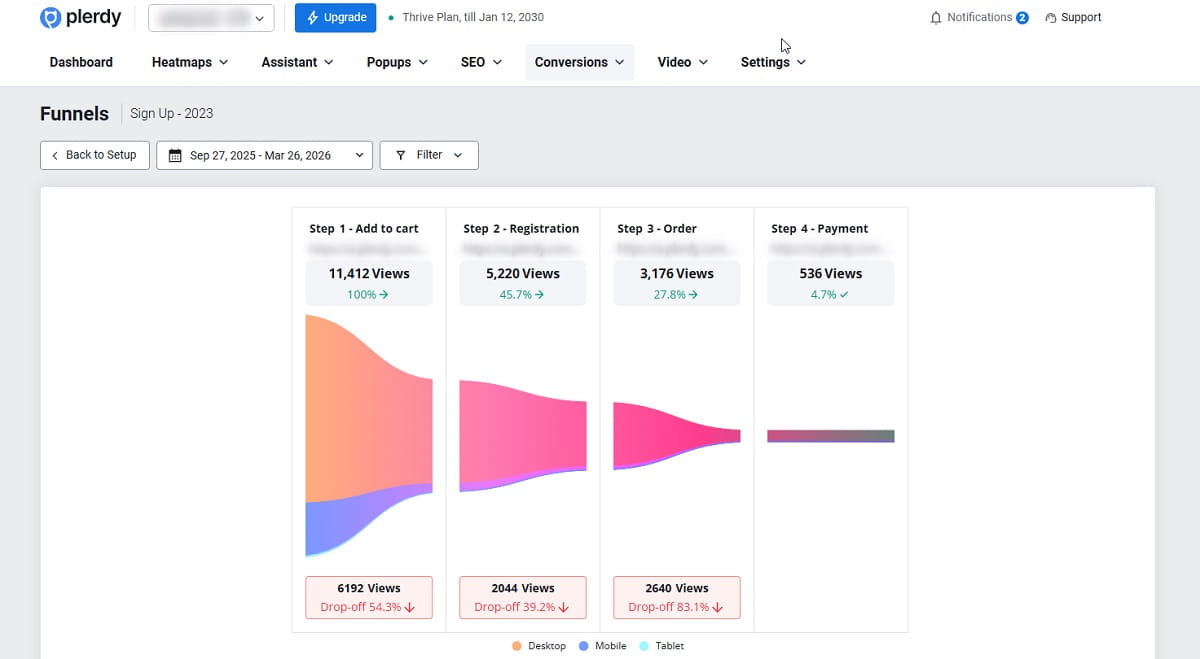
Plerdy is flexible enough to support different funnel structures, but the best funnels stay tied to one job. One goal. One conversion path.
Ecommerce Funnel Example
A classic ecommerce funnel looks like this:
Category → Product → Cart → Order → Thank You Page
This is a practical checkout funnel because each stage reflects a stronger level of purchase intent. If users vanish between Product and Cart, the issue may be offer clarity, pricing, trust, or CTA relevance. If they drop between Order and Thank You Page, the friction is usually closer to checkout flow, form effort, or mobile usability.
Service Website Funnel Example
Service websites usually need shorter funnels because the path is less page-heavy. A practical setup may include Main Page → Services → Contact Us → About Us, depending on the business model and the role of each page.
One important note: educational content and blog traffic often deserve a different funnel. If someone lands on a blog article, their intent is not always equal to someone landing on a services page. Mixing those paths inside one report usually creates weak analysis and misleading drop-off patterns.
Startup or SaaS Funnel Example
For a SaaS funnel, a useful path may be Tool Description → Blog → Registration → Onboarding Steps.
This kind of setup is especially useful when content supports conversion instead of serving as a detached traffic layer. If the jump from Blog to Registration is weak, the problem may not be the signup form itself. Sometimes the content attracts the wrong audience or creates the wrong expectations. That is why user journey analysis needs context, not just numbers.
Traffic Channel Funnel Analysis
Plerdy Website Funnel Analysis can also help compare how different traffic channels behave inside the same path. Direct, paid, organic, social, and other traffic sources often look similar at the top of the funnel and very different one step later.
This is where marketing funnel analysis becomes useful. One channel may send plenty of visits but weak next-step movement. Another may send less traffic but stronger conversion funnel performance. When you spot that pattern, you stop treating traffic volume as the whole story.
How To Read Funnel Drop-Offs Without Guessing
A drop-off is not just a number. It is a sign that the transition between steps did not work well enough for that audience, on that page, in that period.
If users leave early in the funnel, the issue may be traffic quality, message mismatch, or weak page clarity. If they leave late in the funnel, friction is often more specific: form effort, missing trust, bad CTA hierarchy, confusing layout, or poor mobile experience.
Still, low completion does not automatically mean the page is bad. That is an easy mistake. Sometimes the page is fine and the problem starts earlier. Wrong traffic source. Wrong promise in the ad. Wrong expectation created on the previous step.
Traffic volume and date range matter too. A low-traffic period can distort conclusions, especially when you are trying to read small differences between steps. Do not overreact to thin data. Give the funnel enough meaningful traffic before you decide a page is underperforming.
That is the real value of conversion funnel analysis: it helps you see where to investigate first, not where to panic first.
How To Investigate a Weak Funnel Step in Plerdy
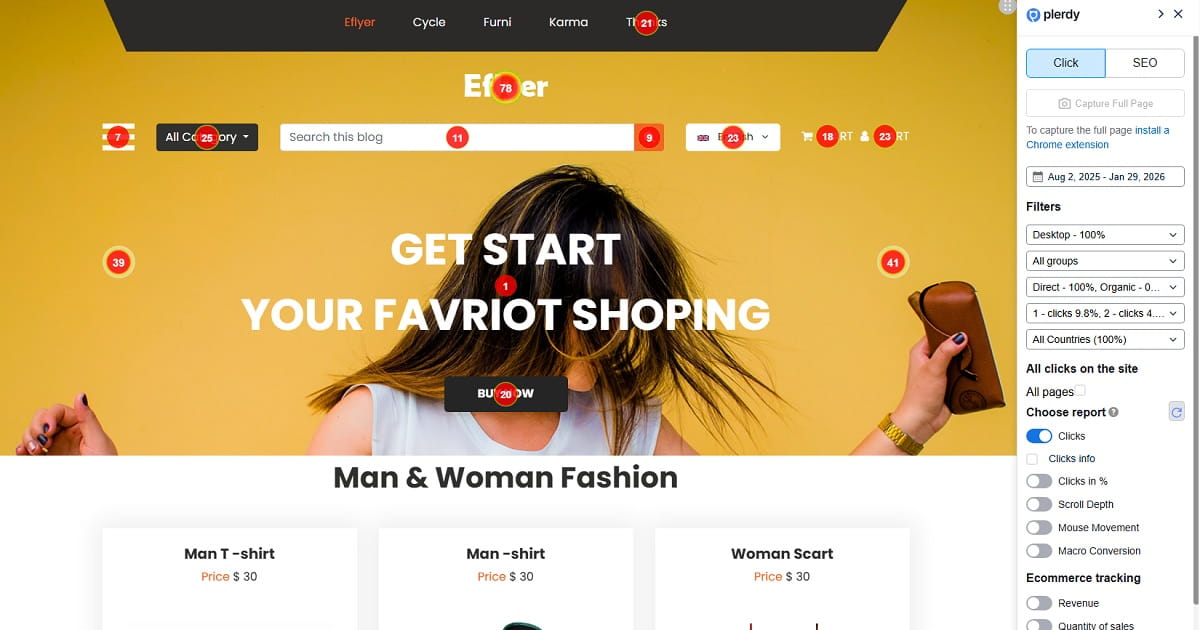
Once you find the weak step, do not stop at the drop-off number. The number tells you where the leak is. It does not tell you why.
This is where Plerdy becomes more useful than a basic funnel report. You can connect the weak page with behavioral tools that reveal what users actually do before they abandon the path.
Review Click Maps
Click maps help you see whether users engage with the main CTA, click dead elements, or spread attention across the wrong areas. If the page gets clicks but not on the intended next-step element, the problem may be hierarchy or clarity.
Check Scroll Depth
Scroll depth shows whether people reach the part of the page that explains the offer or supports the action. Sometimes the CTA is not weak. It is simply placed too low for the traffic quality you are getting.
Look at Hover Behavior and Micro-Events
Hover behavior and micro-events can reveal hesitation. Users pause, inspect, move around, and still do not proceed. That pattern often points to uncertainty rather than complete lack of intent.
Watch Session Recordings
Session recordings are where the story usually sharpens. You can see whether users rage-click, stop at a form, miss a button, hesitate on pricing, or bounce after a confusing interaction. This is the step that turns website funnel analysis from a metric exercise into diagnosis.
Good teams do not guess why users leave. They verify it.
Advanced Funnel Setup Tips
Use Full URL When the Step Must Be Exact
If the step depends on one precise page, use the full URL. This works well for final conversion pages like Thank You pages or specific contact confirmation pages.
Use Partial URL When the Step Represents a Group
If the step includes multiple pages with the same role, use a partial URL. A product-page stage built around a shared segment such as “product” is a practical example. It keeps the funnel aligned with intent while allowing for natural page variation.
Use Device Segmentation When Behavior May Differ
Device segmentation matters more than many teams expect. A funnel that looks acceptable on desktop may leak hard on mobile. If the path feels different across devices, segment the report instead of averaging the problem away.
Use Up to Seven Steps Carefully
Plerdy supports up to seven steps, which is useful when the path genuinely needs more detail. But longer is not automatically better. Sometimes a shorter funnel is sharper because it highlights the real decision points and removes reporting noise.
If a step does not help you diagnose movement or friction, it may not belong in the funnel.
Common Funnel Setup Mistakes To Avoid
- Repeating the same step. This breaks the funnel logic and makes the setup incorrect.
- Mixing unrelated pages. A blog path and a purchase path should not always live in the same funnel.
- Building a funnel that is too long. More steps can make the report harder to read, not smarter.
- Judging performance during weak traffic periods. Thin traffic can create fake certainty.
- Looking at drop-off numbers without behavioral context. The chart shows where. You still need to investigate why.
That last one is the quiet killer. Teams stare at conversion rate percentages, then make redesign decisions without checking session recordings or on-page behavior. That is not analysis. That is expensive guessing.
What To Do After You Find the Weak Step
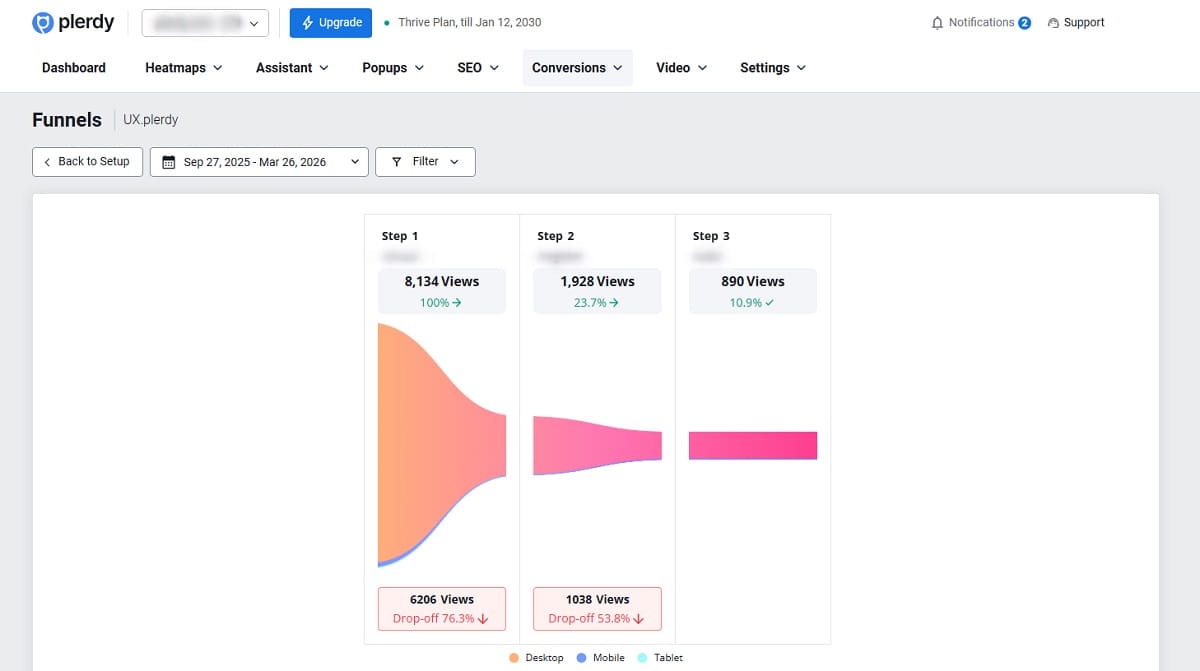
Once Plerdy Website Funnel Analysis reveals the weak stage, the next move should be practical and narrow.
- Improve page clarity if the next action is not obvious
- Remove friction from forms, checkout steps, or overloaded layouts
- Strengthen CTA relevance so the next step matches user intent
- Improve the internal path if users are getting distracted or lost
- Review the mobile experience if device segmentation shows a gap
- Fix the mismatch between traffic source and landing-page promise
The best optimization work usually starts small. One weak step. One clear hypothesis. One behavior pattern confirmed by data. That is how conversion funnel optimization stays grounded instead of turning into redesign theater.
Frequently Asked Questions
What Is Website Funnel Analysis?
Website funnel analysis is the process of tracking how users move through a defined series of pages or funnel steps on a website before they complete a goal. It helps you see the user journey, identify drop-off points, understand where bounce rate rises, and find stages with the lowest conversion rate.
How Do I Create a Funnel in Plerdy?
Start with the first page where users land from traffic channels. Then add the next page they should visit, optionally add another intent-matching page, and finish with the final conversion page such as a Thank You page. In Plerdy, each step must represent a unique stage of the path and should not repeat the previous or next step.
How Many Steps Should a Funnel Have?
Plerdy supports up to seven steps, but the best funnel is usually the shortest one that still shows the real conversion path. If extra steps do not help you understand user movement or diagnose friction, they usually add noise instead of insight.
Why Must Each Funnel Step Be Unique?
Each funnel step must be unique because repeated or overlapping steps break the funnel logic. When the same stage appears twice, the report no longer reflects a clean forward movement through the customer journey, and your drop-off analysis becomes unreliable.
What Pages Should I Include in an Ecommerce Funnel?
A practical ecommerce funnel often includes Category, Product, Cart, Order, and Thank You Page. This setup gives you a clean website conversion funnel that reflects growing purchase intent and makes it easier to spot where users abandon the path.
Can I Analyze Traffic Channels With Funnel Analysis?
Yes. Funnel analysis can be used to compare how direct, paid, organic, social, and other traffic channels perform inside the same funnel. This helps you see which channels send users who continue to the next step and which ones create early drop-off.
How Do I Find Why Users Drop Off Between Steps?
After you identify the weak step in Plerdy Website Funnel Analysis, review the page with click maps, scroll depth, hover behavior, micro-events, and session recordings. The funnel report shows where users leave, while these behavioral tools help explain why they do not continue.
Should I Use Full URLs or Partial URLs in Funnel Setup?
Use a full URL when the funnel step must point to one exact page, such as a Thank You page. Use a partial URL when the step represents a group of pages with the same role, such as product pages that share a URL segment like product. The right choice depends on whether the stage is exact or category-based.
Conclusion
Plerdy Website Funnel Analysis works best when the funnel is built with unique steps, tied to a real conversion path, and reviewed with behavioral evidence instead of assumptions. Build the path cleanly, read the drop-off with context, and use click maps, scroll data, and session recordings to understand what users actually do. That is how funnel analysis becomes useful, not decorative.