

Most small business mistakes don’t look dramatic. They look “fine.” A homepage that sort of explains what you do. A pricing page that feels polite. A checkout that works… if someone is patient. And then you wonder why leads are weak, sales are lumpy, and growth feels like pushing a fridge uphill.
This list is built for small business owners who are busy, budget-aware, and tired of generic advice. Each mistake comes with a clear example, the real cost to your business, and a fix you can do without a full rebrand or a six-month project plan. If you want a calmer business week, start here.
How This List Was Built (And Why It’s Not Generic)
I built this list the same way small business owners experience a business problem: through intent, friction, and outcomes. First, I mapped the common business moments that matter (discovery, trust, conversion, onboarding, retention, and cash flow). Then I looked at what typically breaks in those moments: unclear messaging, weak offer framing, poor UX, missing tracking, sloppy operations, and avoidable finance mistakes.
Every factual claim was checked against current guidance from primary sources (Google Search documentation, Google Ads/Analytics help, the U.S. Small Business Administration, the IRS, and the FTC). If something couldn’t be verified, I treated it as an opinion and kept it practical, not preachy.
Field note: A “small” issue is often a system issue. Fixing one business mistake usually means tightening a few connected steps, not just tweaking a headline.
Common Patterns We See In Site Behavior Data
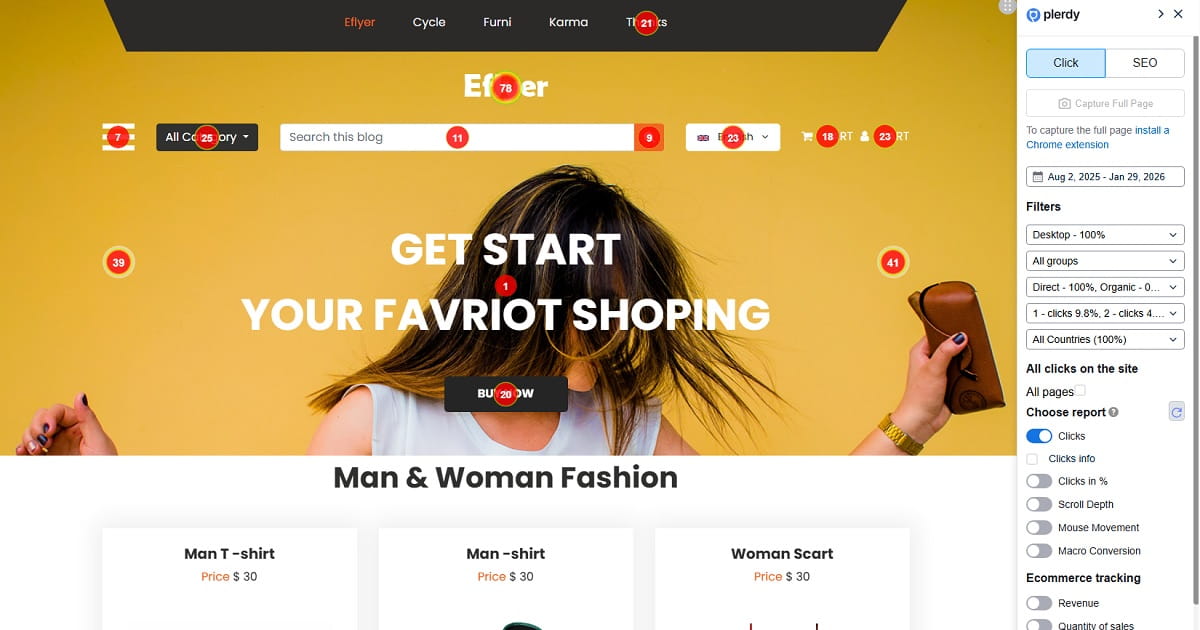
Across many small business sites, the pattern is consistent: visitors don’t “hate” your business. They just don’t understand it fast enough. When navigation is confusing, CTAs are soft, pages are slow, or trust signals are thin, people hesitate and leave. That’s why tools like Plerdy Heatmaps and Session Recordings matter: they help a small business owner see where real users stall, rage-click, or scroll past the important parts (without guessing).
Quick reality check: if your business is relying on assumptions like “people will figure it out,” you’re paying for that belief in lost conversions.
1) Trying To Be For Everyone
What it looks like: A small business homepage that says “high-quality solutions” and “we care about customers,” but never clearly names who the business is for. Example: a service owner lists ten industries and twenty services, then wonders why inquiries are random.
Why it hurts: Positioning confusion is a conversion tax. Prospects can’t quickly self-select, so your business attracts the wrong leads and loses the right ones. This also weakens your organic relevance when your pages don’t align with a specific intent.
How to fix it: Pick a primary buyer and a primary job-to-be-done. Write one crisp line: “We help this customer get this outcome without this headache.” Then align your top navigation and hero CTA around that promise. The SBA’s marketing plan guidance is a solid reference for clarifying target market and competitive advantage. Source
Do This Today:
- Delete two “extra” audiences from your homepage.
- Add one line naming the ideal customer and outcome.
- Make one CTA match that outcome (not “Learn More”).
2) Building A “Nice” Offer Instead Of A Clear One
What it looks like: A small business owner sells “consulting” or “custom projects” with no concrete package. The pricing page says “contact us,” and the offer is explained in paragraphs instead of outcomes.
Why it hurts: Unclear offers create uncertainty, and uncertainty kills action. Buyers don’t know what success looks like, how long it takes, or what the business needs from them. That leads to slow decision cycles and price shopping.
How to fix it: Turn your offer into a simple choice. Package the next step: a paid audit, a starter bundle, or a “first 30 days” plan. Put boundaries around scope and timelines. Then connect your CTA to a measurable action you can track as a key event (so you’re not guessing). Source
Do This Today:
- Write your offer in one sentence with timeframe + outcome.
- Add “what’s included” bullets (3–5 max).
- Replace “Contact us” with a specific next step.
3) Over-Focusing On One Channel
What it looks like: A small business runs paid ads only, or relies only on Instagram, or lives and dies by referrals. When that channel dips, the business panics.
Why it hurts: Single-channel dependency is risk, not strategy. It makes forecasting harder, hiring decisions shakier, and pricing decisions more reactive. It also tends to hide a deeper mistake: the business hasn’t built a reliable conversion path on its own website.
How to fix it: Keep your “main” channel, but build one secondary channel that you control (email list, SEO content, partnerships). Also, make sure your website can measure conversions correctly so you can compare channels honestly. Google Ads’ current setup guidance is a useful baseline for website conversion measurement. Source
Do This Today:
- Pick one backup channel you can start in 30 days.
- Define one conversion action (lead, purchase, booking).
- Track that action as a key event in analytics.
4) Ignoring Retention And Only Chasing New Customers
What it looks like: A small business owner celebrates new leads, but doesn’t track repeat purchases, renewals, referrals, or churn. Customer emails are mostly promos, not helpful follow-ups.
Why it hurts: Acquisition-only thinking keeps your business stressed and expensive. You’re constantly paying to refill the bucket instead of plugging the holes. It also weakens your brand because you never develop a clear “after purchase” experience.
How to fix it: Build a lightweight retention loop: onboarding email, usage tips, check-in at day 7/14/30, and an easy “reorder / rebook” path. Use Conversion Rate Optimization thinking: improve the next step, not just the first click.
Do This Today:
- Write a 3-email onboarding sequence for new customers.
- Add a “next best step” CTA post-purchase.
- Set one monthly reminder to review repeat buyers.
5) Making Navigation A Scavenger Hunt
What it looks like: Menu labels like “Solutions,” “Resources,” and “Explore,” with no clear path to the thing a small business owner actually wants: pricing, proof, and how to buy. On mobile, menus open in one place and close in another. People hesitate.
Why it hurts: Confusing navigation adds friction at the worst time: when a visitor is trying to confirm trust. It also creates “false engagement,” where users click around but never convert.
How to fix it: Rename navigation with plain language (Pricing, Case Studies, Book A Call, Shop). Reduce top-level items. Then use Plerdy Heatmaps to see where people actually click and where they rage-click because the UI feels misleading. If you care about organic performance, don’t forget that Google recommends mobile parity for content and accessibility under mobile-first indexing. Source
Do This Today:
- Rename one vague menu item into a specific one.
- Add “Pricing” to top navigation if you hide it.
- Remove one menu item nobody needs right now.
6) Treating Mobile Like A Smaller Desktop
What it looks like: Tiny tap targets, cramped forms, popups that cover the screen, and a checkout that’s technically responsive but emotionally exhausting. A small business owner tests the site once on their own phone and assumes it’s fine.
Why it hurts: Mobile friction kills momentum. And it’s not just UX—Google’s documentation is clear that smartphone crawling is central to indexing and ranking under mobile-first indexing. If your small business content isn’t accessible on mobile, you’re risking both conversion and visibility. Source
How to fix it: Audit your mobile “money path”: landing page → product/service → form/checkout. Watch real sessions in Session Recordings. Fix the biggest blockers first: forms, sticky headers, and confusing tap areas.
Do This Today:
- Complete your own lead form on mobile without zooming.
- Reduce required form fields by 1–2.
- Make primary CTA thumb-friendly and obvious.
7) Letting Pages Be Slow And Calling It “Normal”
What it looks like: Heavy images, bloated themes, too many scripts, and a homepage that loads like it’s on a dial-up connection. The small business owner says, “It’s fine on my Wi-Fi.”
Why it hurts: Slow pages reduce trust and increase drop-off. They also hurt search performance when experience is poor. Google explains Core Web Vitals (LCP, INP, CLS) as real-world UX metrics and recommends achieving good results for Search success and user satisfaction. Source
How to fix it: Start with the boring wins: compress images, remove unnecessary apps, defer non-critical scripts, and clean up fonts. Use your SEO Checker process to keep performance issues from creeping back in.
Do This Today:
- Compress your largest hero image.
- Remove one plugin/app you don’t truly need.
- Check Core Web Vitals in Search Console.
8) Hiding The Call To Action Or Making It Weak
What it looks like: Buttons that say “Submit” or “Learn More,” CTAs placed only in the footer, or three different CTAs competing on one page. A small business owner assumes visitors will hunt for the next step.
Why it hurts: People don’t want to work to buy. Weak CTAs create decision fatigue, especially when your business is unfamiliar. This mistake shows up as “lots of traffic, no results,” which is the most expensive kind of problem.
How to fix it: Choose one primary CTA per page and make it match the user intent. Then validate with Plerdy Heatmaps (are people seeing it?) and Session Recordings (are they hesitating?).
Do This Today:
- Rewrite one CTA to describe the outcome (not the action).
- Place the primary CTA above the first big scroll break.
- Remove a competing CTA from your main section.
9) Skipping Trust Signals (Or Using Fake Ones)
What it looks like: No testimonials, no clear policies, no real photos, no proof. Or worse: suspicious reviews, vague endorsements, and “as seen on” logos that don’t actually mean anything. A small business owner thinks trust is “brand vibes.”
Why it hurts: Trust is a conversion requirement. And deceptive reviews can create legal risk. The FTC’s consumer reviews and testimonials rule addresses deceptive conduct involving reviews and testimonials and enables penalties for knowing violations. If your business is tempted to “clean up” reviews the wrong way, don’t. Source
How to fix it: Use specific proof: outcomes, context, and constraints. Add real policies (shipping, returns, privacy) and make them easy to find. Keep your social proof honest and transparent.
Do This Today:
- Add one testimonial with a specific result + scenario.
- Link to your privacy and refund/returns pages clearly.
- Remove any “review” that isn’t real or verifiable.
10) Not Tracking Conversions (So Everything Is A Guess)
What it looks like: A small business owner checks pageviews, likes, and “traffic,” but can’t answer basic business questions: which channel drives leads, which page converts, or which form field kills submissions.
Why it hurts: Without conversion tracking, you can’t optimize. You just change things and hope. That’s not a strategy; it’s an expensive habit.
How to fix it: Pick 1–3 key actions and mark them as key events in GA4. Google’s Analytics Help outlines how to mark events as key events, and Google Ads provides updated steps for setting up website conversions. Start there, then get smarter with Conversion Rate Optimization basics. Source Source
Do This Today:
- Define one primary conversion for your business site.
- Mark the related event as a key event in GA4.
- Verify conversions fire on real devices (not just desktop).
11) Running “A/B Tests” Without A Real Hypothesis
What it looks like: A small business owner changes button colors, moves sections around, and calls it testing. Results are noisy, and decisions are based on vibes.
Why it hurts: Random changes create random outcomes. You can’t build a learning system for your business if every test is a guess. The real mistake isn’t testing. The mistake is testing without a reason.
How to fix it: Start with behavior evidence: where are users dropping, hesitating, or misclicking? Use Plerdy Heatmaps and Session Recordings to generate hypotheses. Then test one change tied to one metric. Keep it simple.
Do This Today:
- Write one hypothesis: “If we change X, Y will improve because Z.”
- Choose one metric (leads, add-to-cart, booking starts).
- Test one change at a time for a clean read.
12) Ignoring On-Page SEO Fundamentals
What it looks like: A small business publishes pages without clear headings, messy titles, thin content, or duplicate pages that compete with each other. The owner assumes SEO is “keywords,” not clarity.
Why it hurts: You lose high-intent searches that should be easy wins. You also waste crawl and authority when your business site doesn’t present clean, helpful content.
How to fix it: Clean the basics: one topic per page, clear H2 structure, descriptive titles, and internal links that make sense. Use a lightweight routine with SEO Checker. Also, Google’s page experience documentation is a useful reminder that great content and satisfying usability should work together, not compete. Source
Do This Today:
- Fix one page title to match a clear search intent.
- Add 2–3 internal links to relevant pages.
- Remove or merge one duplicate “me too” page.
13) Pricing Without Knowing Your Numbers
What it looks like: A small business owner sets pricing based on competitors, fear, or what “feels fair,” without knowing gross margin, fulfillment costs, or time cost. Discounts become a crutch.
Why it hurts: Pricing mistakes can quietly sabotage the entire business. You can have great marketing and still bleed cash if the unit economics don’t work. This is one of the most common small business mistakes because it doesn’t show up until you’re busy.
How to fix it: Build a simple pricing sanity check: direct costs, overhead allocation, time cost, and target margin. The SBA’s finance guidance emphasizes using financial statements and tracking costs and liabilities—use that discipline to support pricing decisions. Source
Do This Today:
- List direct costs for your top 3 products/services.
- Calculate a rough margin and compare to your time spent.
- Remove one discount that trains buyers to wait.
14) Cash Flow Blindness (Even When Sales Look “Good”)
What it looks like: A small business owner celebrates revenue, but doesn’t track timing: when money comes in vs. when bills hit. Inventory, payroll, taxes, and subscriptions sneak up. Suddenly the business is stressed.
Why it hurts: Cash flow is oxygen. You can’t make calm decisions when you’re always reacting. This is a classic business mistake because the dashboard says “sales,” but your bank account says “panic.”
How to fix it: Start with a simple weekly cash rhythm: expected inflows, fixed outflows, variable outflows, and a minimum cash threshold. The SBA’s finance guidance is a strong practical reference for using financial statements to manage business reality. Source
Do This Today:
- Write down your next 4 weeks of known bills and payroll.
- Set a “minimum cash” threshold you won’t go below.
- Review receivables and follow up on late payments.
15) Treating Taxes Like A Surprise Problem
What it looks like: A small business owner doesn’t plan for estimated taxes, mixes personal and business spending, and scrambles at filing time. The mistake shows up as stress, penalties, or cash shortages.
Why it hurts: Taxes aren’t optional, and late planning makes the business fragile. The IRS explains that many individuals (including sole proprietors and partners) generally need to pay estimated taxes and may face penalties for underpayment. Source
How to fix it: Separate accounts, set a simple monthly set-aside percentage, and track quarterly obligations. If you’re unsure, get a tax pro to confirm your setup. This is the kind of small business mistake that feels “admin,” but it protects your business life.
Do This Today:
- Separate business and personal spending if you haven’t.
- Set a monthly tax set-aside transfer to savings.
- Put quarterly tax dates on your business calendar.
Quick Self-Audit (10 Minutes)
- Can a new visitor explain what your small business does in 5 seconds?
- Is your offer packaged into a clear next step (not “contact us”)?
- Do you rely on one channel for most business leads or sales?
- Do you have a basic retention loop (onboarding + follow-up) for customers?
- Is your navigation labeled in plain language (Pricing, Book, Shop, Proof)?
- Does your mobile experience feel effortless on the main conversion path?
- Are your core pages reasonably fast, especially on mobile data?
- Is there one primary CTA per page that matches user intent?
- Do you show honest trust signals (policies, proof, real testimonials)?
- Are conversions tracked and marked as key events (not just traffic)?
- Do you test changes based on behavior evidence, not random tweaks?
- Are your on-page SEO basics clean (titles, headings, intent match)?
- Do you know your margin and costs before changing pricing?
- Do you review cash flow weekly (not only when stressed)?
FAQ
What Are The Most Common Small Business Mistakes On A Website?
Most small business mistakes on websites come down to clarity and friction: vague positioning, confusing navigation, weak calls to action, missing trust signals, and a painful mobile experience. Slow pages add another layer of drop-off. If you want quick insight without guessing, combine behavior review (like Session Recordings) with attention mapping (like Plerdy Heatmaps) and fix the biggest blocker first.
Does Page Speed Really Affect SEO And Conversions For A Small Business?
Yes. Slow pages reduce trust and increase abandonment, especially on mobile. Google explains Core Web Vitals (like LCP, INP, and CLS) as experience metrics tied to real-world user satisfaction, and it recommends improving them as part of Search success and usability. Treat performance as a business asset, not a one-time cleanup. Source
How Do I Track Conversions If I’m Not Technical?
Start with one action that matters to your business: a form submit, booking, purchase, or click-to-call. In GA4, you can mark the relevant event as a key event, then verify it fires on real devices. If you run ads, set up website conversions in Google Ads too, so your business decisions are based on outcomes, not traffic. Source Source
Why Is Mobile UX So Critical For Small Business Owners?
Because most customers interact with a small business on a phone: searching, comparing, messaging, and buying. If your mobile experience hides content, breaks forms, or makes CTAs hard to tap, you lose sales before any conversation happens. Google also uses the mobile version of content for indexing and ranking under mobile-first indexing, so mobile issues can hurt both conversion and visibility. Source
Which Trust Signals Matter Most For A Small Business Website?
The best trust signals are specific and easy to verify: real testimonials with context, clear policies (privacy, returns/refunds), visible contact details, and proof like case studies or examples of work. Avoid anything misleading around reviews—FTC guidance covers deceptive review practices and enforcement risk for knowingly violating the rule. Trust is a business requirement, not decoration. Source
How Can Small Business Owners Fix Website Mistakes Without A Full Redesign?
Don’t start with visuals. Start with the conversion path: clear positioning, one primary CTA, low friction on mobile, and measurable tracking. Then use behavior evidence to prioritize fixes—where users hesitate, misclick, or drop. That’s where Plerdy Heatmaps and Session Recordings help a small business owner make changes with confidence instead of guessing.
What’s One Small Business Mistake That Quietly Destroys Profit?
Cash flow blindness. Your business can show “good revenue” and still struggle if money timing is off (payroll, inventory, subscriptions, taxes). Basic finance discipline—reviewing statements, tracking liabilities, and planning for upcoming costs—keeps decision-making calm. The SBA’s guidance on managing finances is a practical starting point for building that habit. Source
Conclusion
Most small business mistakes aren’t “dumb.” They’re normal shortcuts that stop working as the business grows. The fastest wins usually come from clarity (positioning + offer), friction reduction (mobile, speed, navigation), and measurement (tracking real conversions). If you want a practical next step, run a quick behavior review with Plerdy Heatmaps and Session Recordings, then sanity-check on-page basics with SEO Checker. Fix one bottleneck this week. Your future business owner self will feel the difference.