Ecommerce personalization helps shoppers find relevant products and complete purchases with less friction. A strong personalized shopping experience reduces unnecessary choices while preserving customer control. The challenge is not adding more recommendation widgets. It is deciding what to personalize, which signal to trust, and whether the experience creates measurable incremental revenue.
What is Ecommerce Personalization?
Ecommerce personalization is the practice of adapting an online shopping experience to a shopper’s context, behavior, preferences, or purchase history. It can change personalized product recommendations, search results, category ordering, messages, offers, navigation, email, and support. In practice, ecommerce website personalization should make the next useful action easier—not merely prove that the store recognizes a visitor.
A first-time visitor may see regional bestsellers. A returning visitor may see recently viewed products. A customer who bought a printer may receive a timely reminder for compatible ink. Each experience uses different evidence and should be measured against a non-personalized alternative.
How Ecommerce Personalization Works
Personalization connects four components: a signal, a decision, an experience, and an outcome. For example, a shopper views three trail-running shoes; a rule assigns interest in that category; the homepage highlights trail-running products; and the team measures whether this increases product-detail views or purchases. This closed loop turns isolated customer data into personalized shopping experiences that can be tested.
| Component | Question | Example |
|---|---|---|
| Signal | What reliable evidence do we have? | Viewed three products in one category during the session |
| Decision | What rule or model interprets it? | Assign short-term interest in trail-running shoes |
| Experience | What changes for the shopper? | Show relevant products before generic bestsellers |
| Outcome | What should improve? | Product click-through, add-to-cart rate, revenue per visitor |
This is broader than adding a customer’s first name to a message. Salesforce describes ecommerce personalization as tailoring product recommendations, messages, and offers using signals such as search and order history. The useful distinction is control: personalization is selected by the business or an algorithm, while customization is selected directly by the shopper.
Personalization vs. customization: recommending a jacket based on browsing behavior is personalization. Letting a shopper choose size, color, and notification preferences is customization. Strong stores use both, but they should not confuse inferred preferences with choices a customer explicitly made.
Benefits of Ecommerce Personalization – and What it Cannot Fix
The business case is relevance. Better product discovery can reduce choice overload, cross-sells can increase average order value, and timely lifecycle messages can improve retention and customer lifetime value. McKinsey’s research found that faster-growing companies derive 40% more of their revenue from personalization than slower-growing companies. That is an association across companies, not a guarantee that any personalization widget will create a 40% lift.
Faster Discovery
Relevant ranking, filters, and recommendations help shoppers reach a suitable product sooner.
Higher Basket Value
Compatible bundles and useful accessories can increase units per transaction and average order value.
Better Retention
Replenishment reminders and preference-based messages can make repeat purchases easier.
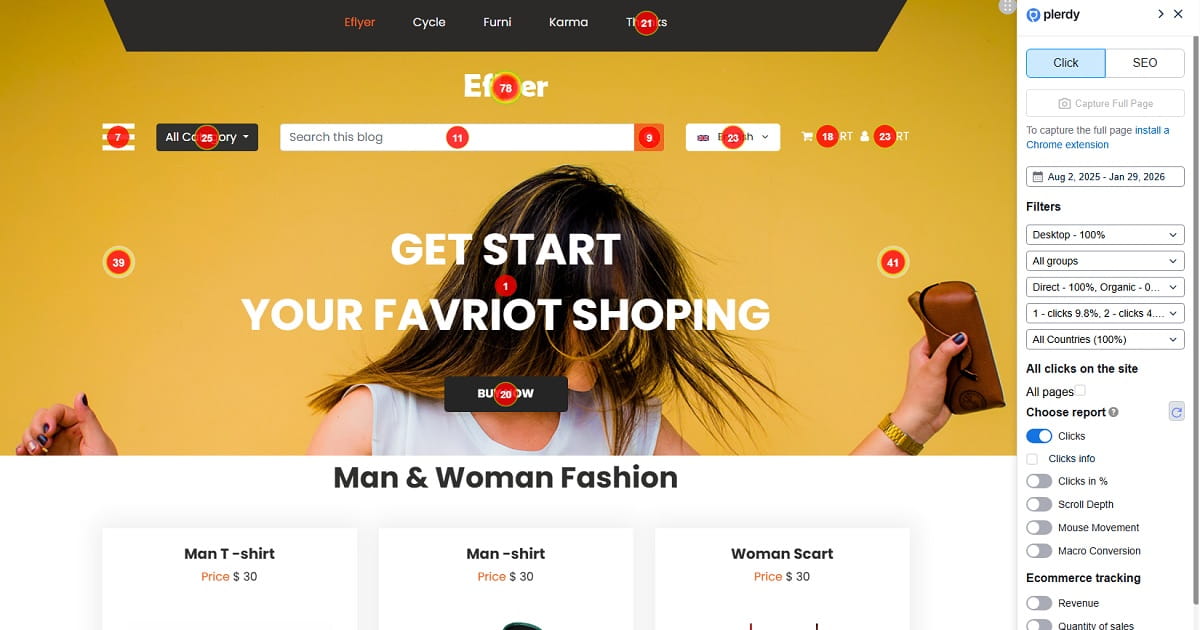
Personalization cannot repair slow pages, weak product information, unclear delivery terms, broken search, or a confusing checkout. If generic navigation fails, personalizing it may simply create several versions of the same failure. Use website heatmaps, session recordings, and conversion funnel analysis to identify friction before adding complexity.
What Data Should Ecommerce Personalization Use?
The best signal is not the most sophisticated one. It is the smallest trustworthy signal that supports a useful decision. Modern programs increasingly combine first-party data—including behavioral data from onsite interactions and transactions—with zero-party data that shoppers intentionally provide. Shopify’s ecommerce personalization guide highlights the value of combining these sources because explicit context can prevent incorrect inferences.
| Data type | Examples | Useful application | Main risk |
|---|---|---|---|
| Contextual | Device, time, region, landing page | Local inventory, delivery message, mobile layout | Location or context may be inaccurate |
| Behavioral first-party | Searches, clicks, views, cart events | Recently viewed items, category affinity, recovery messages | A single session may not reflect a lasting preference |
| Transactional | Orders, returns, order value, purchase frequency | Replenishment, accessories, loyalty segments | Past purchases can represent gifts or one-time needs |
| Zero-party | Size, goals, style, budget, stated preferences | Quiz results, saved filters, preference center | Preferences become stale if never updated |
| Predictive | Propensity, product affinity, churn risk | Ranking and next-best action at scale | Opaque models can amplify bad input data |
Privacy guardrail: collect only data needed for a defined customer benefit, explain the use clearly, honor consent and deletion choices, and exclude sensitive categories. Do not treat this article as legal advice; requirements vary by market and data practice.
Four Levels of Ecommerce Personalization
Not every store needs AI-driven one-to-one experiences. Choose the simplest level that your traffic, catalog, data quality, and testing capacity can support.
| Level | Method | Example | Best fit |
|---|---|---|---|
| 1. Contextual | Known session context | Show local delivery availability | New stores and anonymous traffic |
| 2. Segment-based | Shared traits or behaviors | Different category banner for new vs. returning visitors | Stores with clear high-volume segments |
| 3. Behavior-based | Recent individual actions | Recently viewed products and cart-aware recommendations | Stores with reliable event tracking |
| 4. Predictive | Models choose or rank experiences | Individual product ranking based on purchase propensity | Large catalogs and sufficient conversion data |
The fourth level overlaps with hyper-personalization, where real-time personalization adapts an experience at the individual level. AI personalization may use machine learning and artificial intelligence to rank products or predict the next useful action. Start there only when simpler rules have been measured and the extra complexity has a clear payoff.
12 Ecommerce Personalization Strategies Across the Funnel
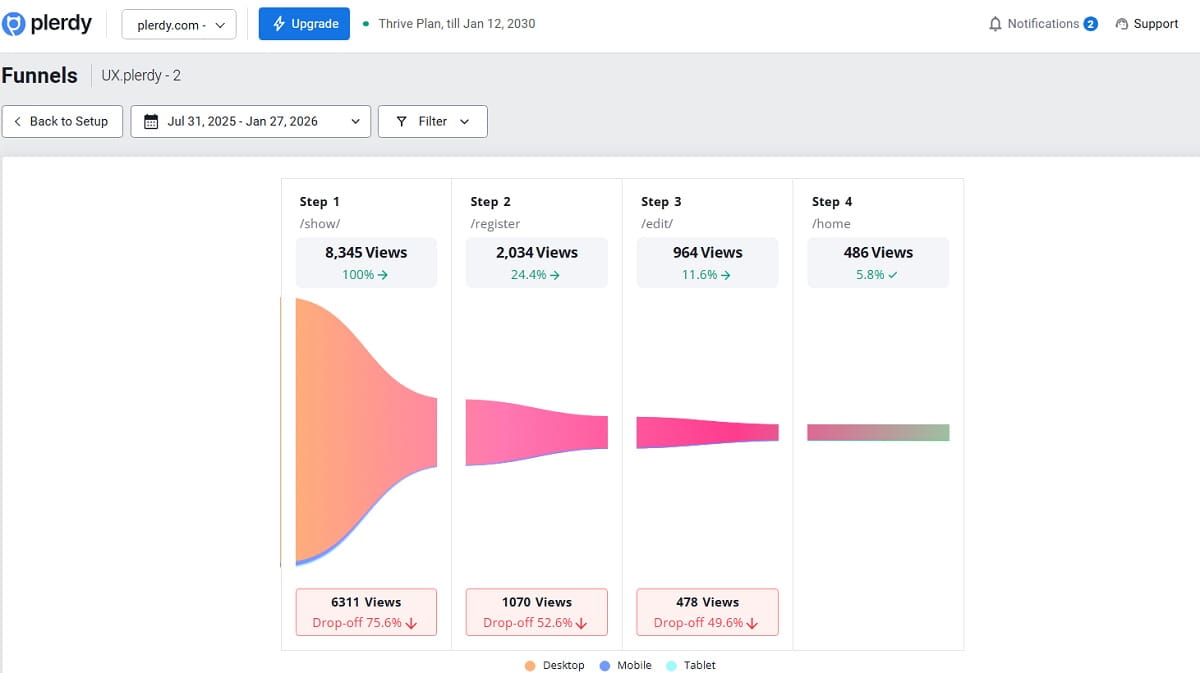
1. Match Landing Pages to Acquisition Intent
Keep the promise made by an ad, email, influencer, or search result. If a visitor clicked an ad for waterproof hiking boots, land them on a relevant collection with matching copy—not a generic homepage. Dynamic content can preserve the campaign context without hiding access to the rest of the catalog.
2. Adapt Category Merchandising
Prioritize products using a combination of availability, margin, popularity, and shopper interest. A returning visitor who repeatedly browses linen shirts may see that material earlier, while a new visitor receives a stable bestseller order. Always offer visible sorting and filters so the shopper can override the inferred ranking.
3. Personalize Onsite Search
Use spelling tolerance, synonyms, inventory, and context before attempting individual prediction. Then test whether prior categories, brands, sizes, or price ranges improve search-result relevance. Measure search exits and post-search conversion—not only result clicks.
4. Show Recently Viewed Products
This low-risk tactic reduces the work required to return to a product. Keep the list short, preserve it across sessions when appropriate, and let users clear it. It is often a better first experiment than opaque “recommended for you” logic.
5. Make PDP Recommendations Complementary
A product detail page should answer the next decision. Use compatible accessories, alternatives for comparison, or complete-the-look items. Avoid displaying substitutes so aggressively that they distract a shopper who is already close to adding the current product.
6. Build Cart-Aware Cross-Sells
Recommend items that are compatible, available, easy to add, and proportionate to the cart value. A camera memory card is useful; an unrelated bestseller is noise. Suppress products already purchased or currently in the cart.
7. Use Behavioral Messages, not Immediate Pop-Ups
Trigger messages after meaningful behavior: repeated product comparisons, deep scroll without action, cart hesitation, or exit intent. A first-visit popup shown before the shopper understands the store is targeting, but it is rarely useful personalization. Plerdy’s smart forms and pop-ups can connect display rules with onsite behavior.
8. Personalize Social Proof Carefully
Surface reviews that match the product variant, use case, or question being considered—for example, reviews about fit beside a size selector. Do not hide balanced feedback or imply that every customer had the same outcome.
9. Remember Customer Preferences
Save size, preferred store, language, dietary needs, or notification choices when the shopper asks you to. Explicit preferences are usually more reliable than inferred demographic assumptions, and a preference center gives customers control.
10. Recover Carts With Product Context
An abandoned-cart email or onsite reminder should show the correct product, variant, availability, and an easy route back. Frequency-cap the sequence and stop it immediately after purchase. If the item is unavailable, offer close alternatives instead of driving the customer into a dead end.
11. Send Replenishment Reminders
Estimate the replacement window for consumable products, then let customers adjust timing. A reminder for coffee, skincare, or pet food is useful when based on a plausible usage cycle; repeated reminders for a durable product feel careless.
12. Personalize Loyalty Experiences
Show progress, available benefits, and rewards that match actual interests. Personalization should make the program easier to use, not create unexplained price differences. Shopify maps personalization across awareness, consideration, conversion, and loyalty in its funnel-based examples.
Ecommerce Personalization Examples you Can Adapt
| Store scenario | Signal | Personalized experience | Primary KPI |
|---|---|---|---|
| Fashion | Shopper selected a size twice | Preselect saved size and prioritize available products | Product-to-cart rate |
| Beauty | Quiz answers about skin goal and shade | Recommend a routine with explanations | Quiz-to-purchase rate |
| Electronics | Laptop added to cart | Show only compatible case, dock, and adapter | Attach rate |
| Grocery | Repeat purchase interval | Restock reminder near the expected depletion date | Repeat purchase rate |
| Home goods | Repeated views of one room category | Resume the collection and recently viewed products | Revenue per visitor |
| B2B ecommerce | Account contract and prior orders | Show approved catalog, pricing, and fast reorder | Time to reorder |
Worked Example: a Skincare Product Finder
Problem: shoppers visit several serum pages but leave without choosing. Hypothesis: explaining the best match for a stated skin goal will reduce uncertainty. Experience: a three-question quiz recommends up to three products and explains why each matches. Control: the existing category page. Primary metric: revenue per eligible visitor. Guardrails: return rate, support contacts, and quiz completion.
This approach uses information the shopper intentionally provides instead of guessing. Shopify documents a similar “Find My Shade” flow from Jones Road Beauty in its website personalization examples.
Ecommerce Personalization best Practices: How to Build a Strategy
A practical ecommerce personalization strategy begins with one measurable customer problem, not with a tool or algorithm. Use the following sequence to keep the implementation focused and testable.
- Choose one commercial problem. Examples include low search conversion, weak accessory attach rate, or poor repeat purchase.
- Define the eligible audience. State exactly who sees the experience and who remains in the control.
- Select the minimum useful signal. Prefer explicit or recent behavior over broad assumptions.
- Write the decision rule. Make exclusions, fallback behavior, frequency caps, and expiration clear.
- Design a useful experience. Explain relevance when needed and preserve shopper control.
- Validate tracking. Confirm exposure, clicks, orders, revenue, device, and experiment assignment before launch.
- Run a controlled test. Compare with a generic experience or a holdout group.
- Review segments and guardrails. A total lift can conceal harm to new visitors, mobile users, or a key product category.
Personalization Hypothesis Template
For [eligible audience], using [signal] to show [experience] will improve [primary business metric] because [customer-friction evidence]. We will compare it with [control] and monitor [guardrail metrics].
Use behavioral evidence rather than intuition. Ecommerce analytics can reveal products, pages, traffic sources, and paths associated with purchases, while recordings and heatmaps show how shoppers interact with the proposed placement. This keeps customer experience improvements tied to observed friction instead of assumptions.
How to Measure Ecommerce Personalization
Do not report the conversion rate of people who clicked a recommendation as proof that the recommendation worked. Clickers are self-selected and often had greater purchase intent. Measure all eligible visitors assigned to the personalized experience against a randomized control or a persistent holdout group.
| Objective | Primary metric | Diagnostic metrics | Guardrails |
|---|---|---|---|
| Product discovery | Revenue per eligible visitor | Search exits, PDP views, recommendation CTR | Bounce rate, zero-result rate |
| Cross-sell | Incremental gross profit per visitor | Attach rate, units per order | Checkout completion, returns |
| Cart recovery | Incremental recovered revenue | Return-to-cart rate, email click rate | Unsubscribes, complaints |
| Retention | Repeat purchase rate | Time to second order, reorder rate | Discount cost, churn |
| Experience quality | Task completion | Time to product, errors, survey feedback | Support contacts, page speed |
Revenue matters, but margin and operational cost matter too. A recommendation that raises average order value through heavy discounts may reduce profit. Use Plerdy Ecommerce Analytics to connect purchases with pages and onsite elements, and an A/B testing process to compare the personalized and default experiences.
Testing note: predefine the primary metric, required sample, experiment duration, and stopping rule. Avoid checking results daily and stopping the first time the personalized variant appears ahead.
Ecommerce Personalization Tools: What do you Actually Need?
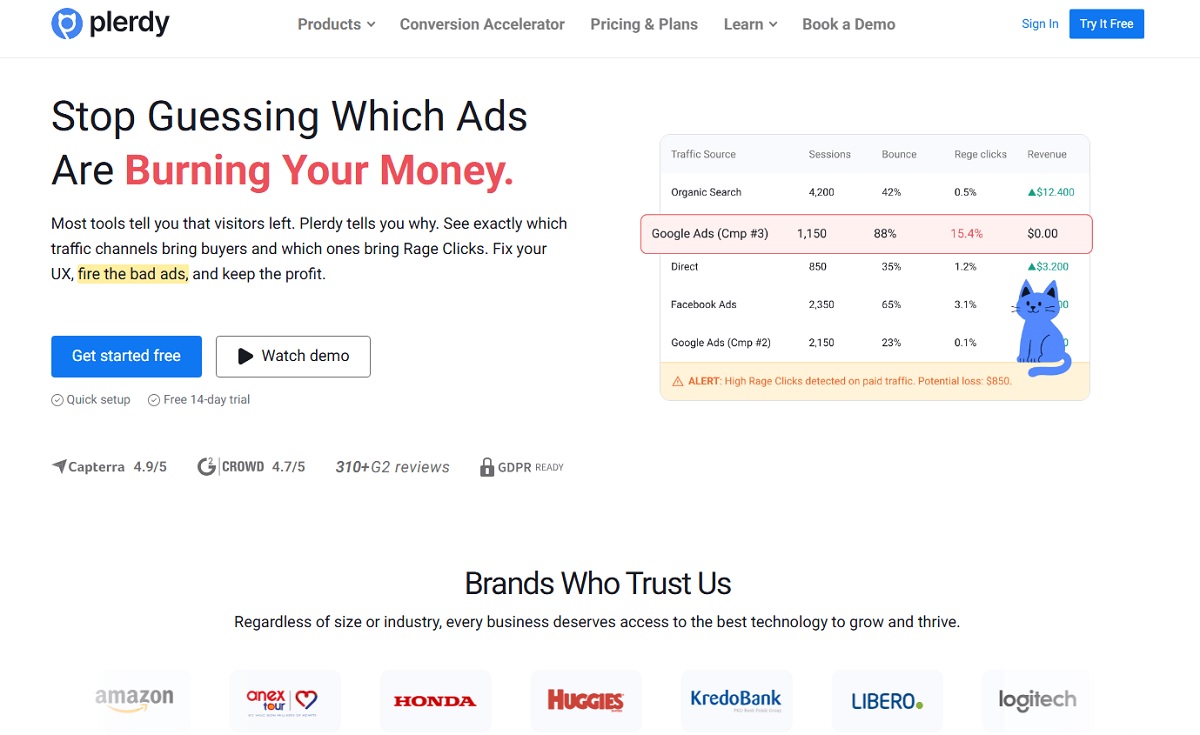
A personalization stack usually needs data collection, audience or decision logic, experience delivery, and measurement. An ecommerce personalization platform may cover several layers, while an ecommerce personalization solution may specialize in search, recommendations, messaging, or testing. When comparing ecommerce personalization software, judge the fit against a defined use case; no tool compensates for unreliable event data.
| Tool category | Role | Examples | Selection question |
|---|---|---|---|
| Behavior and CRO analytics | Find friction and validate outcomes | Plerdy | Can we connect exposure and onsite behavior with revenue? |
| Commerce platform | Catalog, customer, order, and storefront foundation | Shopify, WooCommerce, Adobe Commerce | Which personalization hooks and customer data are native? |
| Search and discovery | Search, recommendations, and merchandising | Algolia, Nosto, Constructor | Does it handle our catalog size, language, and traffic volume? |
| Customer engagement | Email, SMS, web messages, and lifecycle automation | Klaviyo, Braze | Can it suppress irrelevant messages across channels? |
| Experimentation | Controlled tests and feature delivery | Optimizely, VWO | Can it keep assignment stable and report incremental results? |
For a broader buying comparison, see Plerdy’s guide to ecommerce tools for businesses. Evaluate integrations, identity resolution, real-time capability, testing design, fallbacks, privacy controls, reporting, implementation effort, and total cost. Ask vendors to demonstrate one of your actual scenarios with your event model—not a generic recommendation carousel.
Seven Ecommerce Personalization Mistakes to Avoid
- Personalizing before fixing basic UX. Broken filters and vague product pages remain broken for every segment.
- Treating one click as a permanent preference. Interests change, and people shop for others.
- Optimizing recommendation CTR. Clicks can move without incremental purchases or profit.
- Having no control group. You cannot separate personalization lift from seasonality or campaign changes.
- Creating inconsistent prices or messages. Unexplained differences damage trust and supportability.
- Ignoring cold-start visitors. Every personalized component needs a useful default when history is unavailable.
- Collecting data without a customer benefit. More fields increase risk and rarely improve a weak hypothesis.
Good personalization can also decide not to intervene. Keep the default experience when confidence is low, the catalog is small, a recommendation could expose sensitive inference, or the shopper has already made a clear choice.
A practical 30-day Ecommerce Personalization Roadmap
| Period | Actions | Deliverable |
|---|---|---|
| Days 1–7 | Audit tracking, funnels, search, product pages, and customer feedback. Rank friction by revenue opportunity. | One problem statement and baseline |
| Days 8–14 | Choose audience, signal, rule, fallback, control, primary metric, and guardrails. | Testable hypothesis and tracking plan |
| Days 15–21 | Build the smallest experience, QA mobile and desktop behavior, validate exposure and purchase events. | Production-ready experiment |
| Days 22–30 | Launch, monitor data quality and severe guardrail issues, document the analysis date. | Running controlled test—not a premature verdict |
Find the Behavior Worth Personalizing
Plerdy combines ecommerce analytics, heatmaps, session recordings, funnels, event tracking, forms, and A/B testing. Use it to find where shoppers struggle, build an evidence-based hypothesis, and verify whether a personalized experience improves conversion and revenue.
Ecommerce personalization FAQ
What is ecommerce personalization?
Ecommerce personalization is the practice of adapting product discovery, content, offers, messages, or service to a shopper’s context, behavior, stated preferences, or purchase history. Its purpose is to make the shopping journey more relevant and easier to complete.
What are examples of personalization in ecommerce?
Examples include recently viewed products, personalized search ranking, compatible accessories, saved sizes, local inventory, cart reminders, replenishment messages, quiz-based recommendations, and loyalty offers based on stated preferences.
How does ecommerce personalization work?
A personalization system collects an eligible signal, applies a rule or model, delivers a different experience, and measures the outcome. For example, recent category views may change product ranking, while a controlled test measures incremental revenue per visitor.
What data is used for ecommerce personalization?
Common inputs include device and location context, onsite searches and product views, cart events, orders, returns, loyalty activity, and preferences a customer explicitly provides. Use only the data necessary for a clear customer benefit and apply appropriate privacy controls.
What is the difference between personalization and customization?
In personalization, the business or an algorithm adapts the experience using available signals. In customization, the shopper directly selects preferences or changes the product or interface. A product recommendation is personalization; choosing a size or arranging a dashboard is customization.
Does ecommerce personalization increase conversion rates?
It can increase conversion when it removes a real decision barrier, but the effect is not automatic. Measure eligible shoppers against a randomized control or holdout group and track revenue, profit, returns, and customer-experience guardrails.
What are the best ecommerce personalization tools?
The best stack depends on the use case. Stores may combine a commerce platform, search and recommendation software, lifecycle messaging, experimentation, and behavioral analytics. Plerdy is useful for identifying conversion friction and measuring how shoppers interact with personalized elements.
How should a small ecommerce store start with personalization?
Start with one low-risk, high-volume use case such as recently viewed products, local delivery information, or a cart-aware accessory. Define one primary business metric, retain a default experience, and test the change before adding more rules or AI.
Start With Relevance, then Earn Complexity
Effective ecommerce personalization is a disciplined conversion strategy: diagnose friction, choose a reliable signal, deliver a useful experience, and measure incremental value. Begin with a transparent rule that solves one customer problem. Keep a strong default, give shoppers control, and add predictive sophistication only after the simpler experience proves its value.