

Conversion tracking connects website behavior with business outcomes. With Plerdy, teams can connect conversion events with funnels, heatmaps, session recordings, and revenue data to understand what happened before a lead or purchase—not merely count visits to a thank-you page.
What Is Conversion Tracking?
Conversion tracking is the process of recording valuable user actions and connecting them with the pages, campaigns, channels, or experiences that preceded them. A conversion can be a purchase, qualified lead, booked demo, trial activation, subscription, phone call, or another outcome tied to a business objective.
Anyone learning how to track conversions should begin with four questions: What happened? How much was it worth? Which journey led to it? Can the result be trusted? Website conversion tracking that cannot answer all four is event collection—not a complete measurement system.
How Does Conversion Tracking Work?
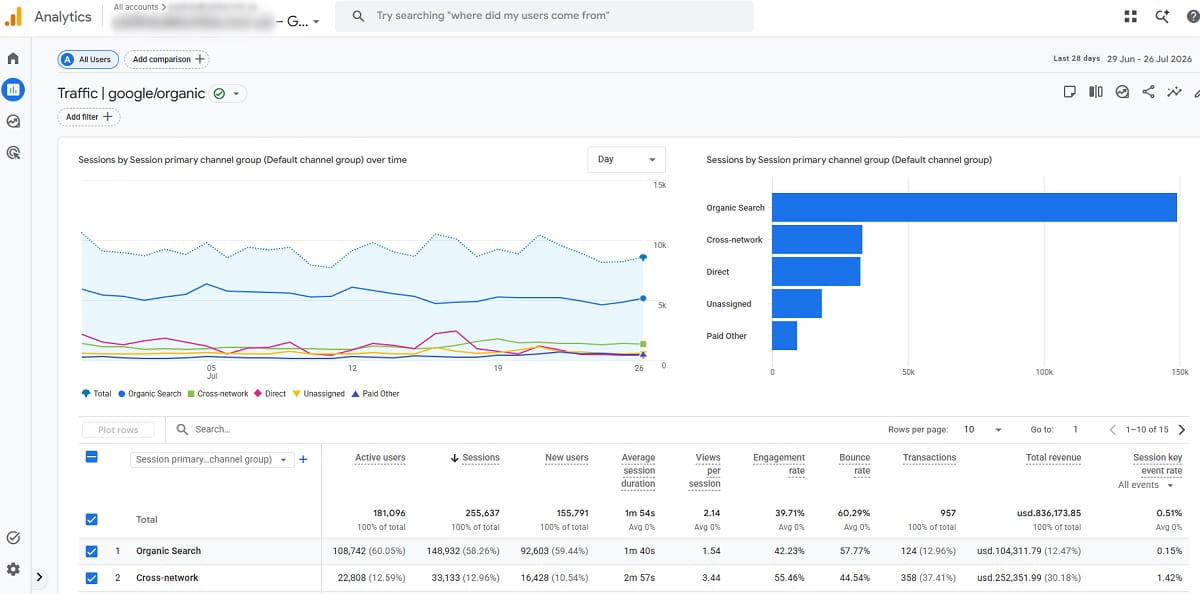
A tracking system detects an action, creates an event, attaches useful parameters, sends the event to one or more destinations, and connects it with a source or journey. The basic mechanism may be a conversion tracking tag, tracking pixel, analytics SDK, server request, webhook, CRM update, or offline import.
| Stage | What happens | Purchase example | Lead example |
|---|---|---|---|
| 1. Action | A user completes a meaningful task | Payment is approved | Demo form is successfully submitted |
| 2. Event | The site or server emits a named event | purchase | generate_lead |
| 3. Parameters | Context is attached | Transaction ID, value, currency, items | Form ID, lead type, page, consent state |
| 4. Destination | Analytics and advertising systems receive it | GA4, Google Ads, store database | GA4, Ads, CRM |
| 5. Attribution | Credit is assigned to touchpoints | Paid search, email, organic, direct | Campaign, landing page, sales follow-up |
| 6. Validation | Tracked totals are reconciled with a source of truth | Completed, non-test orders | Valid CRM leads or opportunities |
For Google Ads, website conversion measurement analyzes actions completed after an ad interaction. Google’s current web conversion setup documentation supports conversions created through the Google tag and conversions based on linked Google Analytics data. A broader website analytics setup should also measure organic, referral, email, direct, and onsite behavior.
Why Is Conversion Tracking Important?
Prove Business Impact
Connect campaigns and pages with qualified leads, transactions, revenue, and profit rather than traffic alone.
Optimize the Funnel
See which steps users complete, where they abandon, and which segments experience the greatest friction.
Train Ad Platforms
Send accurate primary conversions and values so bidding systems optimize toward outcomes that matter.
Good tracking changes decisions. It tells a marketer which campaign produces revenue, a product team which feature predicts activation, a CRO specialist where qualified users drop out, and a sales team which sources produce opportunities rather than low-quality form submissions.
Bad tracking does the opposite. Duplicate purchases inflate return on ad spend, generic “lead” events hide lead quality, missing cross-domain context turns paid traffic into referrals, and marking every engagement as a primary conversion teaches an ad platform to pursue easy actions instead of business outcomes.
Macro Conversions Vs. Micro Conversions
A macro conversion represents the primary result of a journey: a purchase, paid subscription, qualified application, or signed contract. A micro conversion is an actionable step that indicates progress or helps diagnose friction, such as adding a product to the cart, starting checkout, viewing pricing, or completing onboarding.
| Business model | Macro conversion | High-value micro conversions | Diagnostic events |
|---|---|---|---|
| Ecommerce | Completed purchase | Add to cart, begin checkout, add payment information | Product view, search, filter use, coupon error |
| B2B SaaS | Qualified opportunity or paid account | Demo booked, trial activated, integration connected | Pricing view, form start, onboarding step |
| Lead generation | Qualified lead or completed service | Form submission, verified phone call, appointment booked | CTA click, form error, calendar open |
| Publisher | Paid subscription | Account created, newsletter confirmed, paywall started | Article depth, return visit, offer view |
| Marketplace | Completed transaction | Seller contacted, listing saved, checkout started | Search, filter, comparison, empty result |
Plerdy’s existing guide explains micro and macro conversions in greater detail. For tracking design, the crucial rule is: measure many useful events for analysis, but reserve primary optimization goals for outcomes closely tied to revenue or qualified demand.
Do not assign value to every click. A video play or scroll can be useful for diagnosis without being economically equivalent to a lead. Inflated proxy values make revenue attribution and automated bidding less trustworthy.
What Website Conversions Should You Track?
The way you track website conversions should reflect actual business decisions. Track an action when it is important, unambiguous, technically observable, and actionable. “User engaged” is too vague. “Pricing CTA clicked,” “checkout started,” and “payment confirmed” can be defined and tested.
Ecommerce conversion tracking normally culminates in a validated purchase with dynamic revenue, while lead conversion tracking should continue beyond a raw form submission to qualification, opportunity, and closed revenue when those stages are available.
| Question | Good answer | Warning sign |
|---|---|---|
| Does it represent business value? | Purchase, qualified lead, activation | Any visit or accidental click |
| Can it be defined precisely? | Successful server response after submission | Form button clicked regardless of errors |
| Can the team influence it? | Checkout completion or demo booking | A metric with no owner or response |
| Can it be validated? | Matched to order, CRM, or backend record | No independent source of truth |
| Is it useful at current volume? | Enough events to analyze by key segments | Rare proxy selected only to fill reports |
Choose one denominator for each rate. An ecommerce conversion rate might use sessions or users; a checkout completion rate should use checkout starters. Document the denominator so two dashboards do not present different percentages with the same label.
Six Conversion Tracking Methods
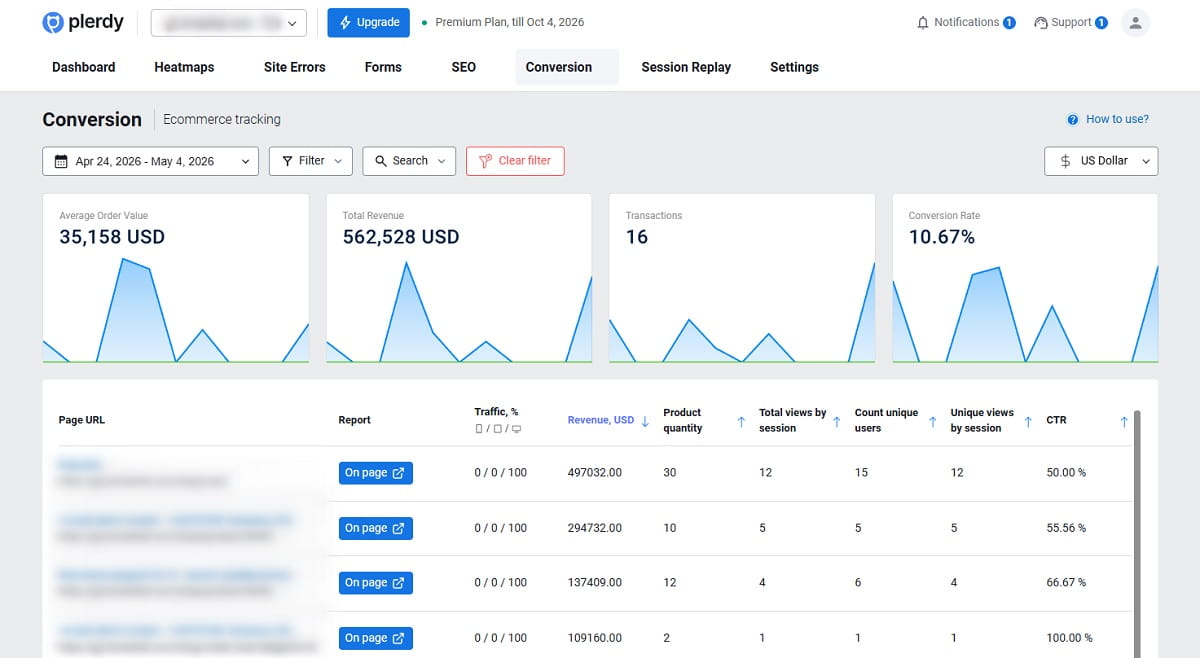
1. Destination Or URL Tracking
A unique confirmation URL can trigger a conversion when loaded. It is easy to implement, but it can count refreshes, direct revisits, or pages reached without completing the intended action. Use it only when the destination is exclusive and transaction-specific parameters are unnecessary.
2. Event-Based Tracking
Event tracking records a successful action such as a form submission, account creation, file download, or purchase. It works with dynamic sites and single-page applications, and it can carry structured parameters. Trigger the event on confirmed success—not on the initial button click.
3. Client-Side Tags And Conversion Pixels
A browser executes JavaScript or loads a pixel when the event occurs. Client-side tracking is accessible and supports rich page context, but browser restrictions, ad blockers, navigation timing, consent state, and implementation errors can reduce observability.
4. Server-Side Conversion Tracking
The backend sends a conversion after validating the business outcome. This is useful for approved payments, subscriptions, refunds, qualified leads, and other events that should not rely only on the browser. Server-side tracking still requires consent, governance, deduplication, security, and accurate campaign identifiers; it is not permission to bypass user choices.
5. Offline Conversion Tracking
Offline conversion tracking connects a website lead with later CRM outcomes such as qualified opportunity, signed contract, attended appointment, or completed phone sale. Capture appropriate click and lead identifiers, retain them through the CRM, then import later lifecycle events with timestamps and values.
6. Cross-Domain Conversion Tracking
Cross-domain conversion tracking preserves a journey when landing pages, checkout, scheduling, authentication, or payment occur on different domains. Configure the approved domains, referral exclusions where appropriate, linker behavior, and consent. Test the complete journey rather than checking each domain separately.
Create a Conversion Tracking Plan Before Adding Tags
A tracking plan is the contract between marketing, product, development, analytics, and sales. It defines what an event means, when it fires, what data it sends, where it goes, and how the team verifies it.
| Event | Business definition | Trigger | Required parameters | Destination | Primary? |
|---|---|---|---|---|---|
| generate_lead | Valid demo form accepted | Successful backend response | form_id, lead_type, page_location | GA4, Ads, CRM | Only if lead quality is adequate |
| schedule_demo | Calendar booking confirmed | Booking ID created | booking_id, meeting_type | GA4, Ads, CRM | Yes for demo-led sales |
| begin_checkout | Checkout successfully opened | First checkout step displayed | currency, value, items | GA4, funnel tool | No |
| purchase | Non-test order approved | Server confirms payment/order | transaction_id, value, currency, items | GA4, Ads, store database | Yes |
| lead_qualified | Lead meets agreed CRM criteria | CRM stage changes | lead_id, value, timestamp, click ID if allowed | Ads, BI | Yes for long sales cycles |
Use lowercase event names, underscores, stable definitions, and a documented owner. Do not place personal or sensitive information in analytics event names, URLs, or unrestricted parameters.
Google’s data layer documentation recommends passing structured information to tags instead of scraping values scattered across page markup. A predictable data layer makes conversion tracking setup, QA, and maintenance substantially easier.
For a Plerdy-specific implementation, use the step-by-step guide to setting up custom events through Google Tag Manager and sending them to GA4.
window.dataLayer = window.dataLayer || [];
window.dataLayer.push({
  event: "purchase",
  ecommerce: {
    transaction_id: "T_12345",
    value: 129.90,
    currency: "USD",
    items: [
      { item_id: "SKU_42", item_name: "Example Product", price: 129.90, quantity: 1 }
    ]
  }
});
This is an illustrative data-layer message, not a universal copy-and-paste implementation. Your store, consent platform, tag container, and analytics destinations must be configured to consume it correctly.
How To Set Up Conversion Tracking Step By Step
- Define primary business outcomes. Select purchases, qualified leads, subscriptions, or another outcome the organization recognizes as valuable.
- Map the funnel. List the necessary steps before the macro conversion and the diagnostic events that explain abandonment.
- Write event specifications. Document names, triggers, parameters, values, counting rules, destinations, owner, and source of truth.
- Choose implementation methods. Use URL rules for simple exclusive confirmations, browser events for interaction context, and validated server or CRM events for final outcomes where appropriate.
- Deploy the base tag or SDK. Install it consistently across approved pages and environments. Configure consent before dependent tags execute.
- Implement events and values. Pass real dynamic values, currency, and unique IDs. Do not hard-code every purchase as the same amount.
- Configure analytics key events. In GA4, collect the event first and then identify important actions as key events. Google’s current GA4 instructions explain that marking an event affects reporting from that point forward rather than rewriting historical data.
- Create advertising conversions. Decide which conversions are primary for bidding, which remain secondary for observation, how they are counted, and which conversion value is used.
- Connect CRM and offline outcomes. Preserve the identifiers required to return qualified or closed revenue signals while following consent and platform requirements.
- Test before release. Validate one clean event for each success path, failure path, device class, domain transition, payment method, and consent state.
- Reconcile after release. Compare analytics and ad-platform totals with backend orders or CRM records on a documented cadence.
Definition Of Done
A conversion is not “implemented” because a tag fired once in preview mode. It is done when the business definition is documented, the event fires once on real success, required parameters are correct, duplicates are prevented, consent behavior is verified, destination reports receive it, and totals stay within an investigated tolerance of the source of truth.
GA4 Vs. Google Ads Vs. Google Tag Manager Conversion Tracking
| Product | Primary role | What it does not replace |
|---|---|---|
| Google Tag Manager | Deploys and controls tags, triggers, and variables | It is not the business source of truth or an attribution report |
| Google Analytics 4 | Analyzes events, key events, audiences, journeys, and cross-channel performance | It does not validate orders or CRM revenue by itself |
| Google Ads | Measures and optimizes outcomes associated with Google Ads interactions | It is not a neutral all-channel analytics system |
| Backend or CRM | Confirms orders, lead status, refunds, subscriptions, and recognized revenue | It may not explain onsite behavior or marketing touchpoints without integration |
| Plerdy | Connects events and conversions with funnels, heatmaps, recordings, and page behavior | It does not replace ad-platform bidding or the financial ledger |
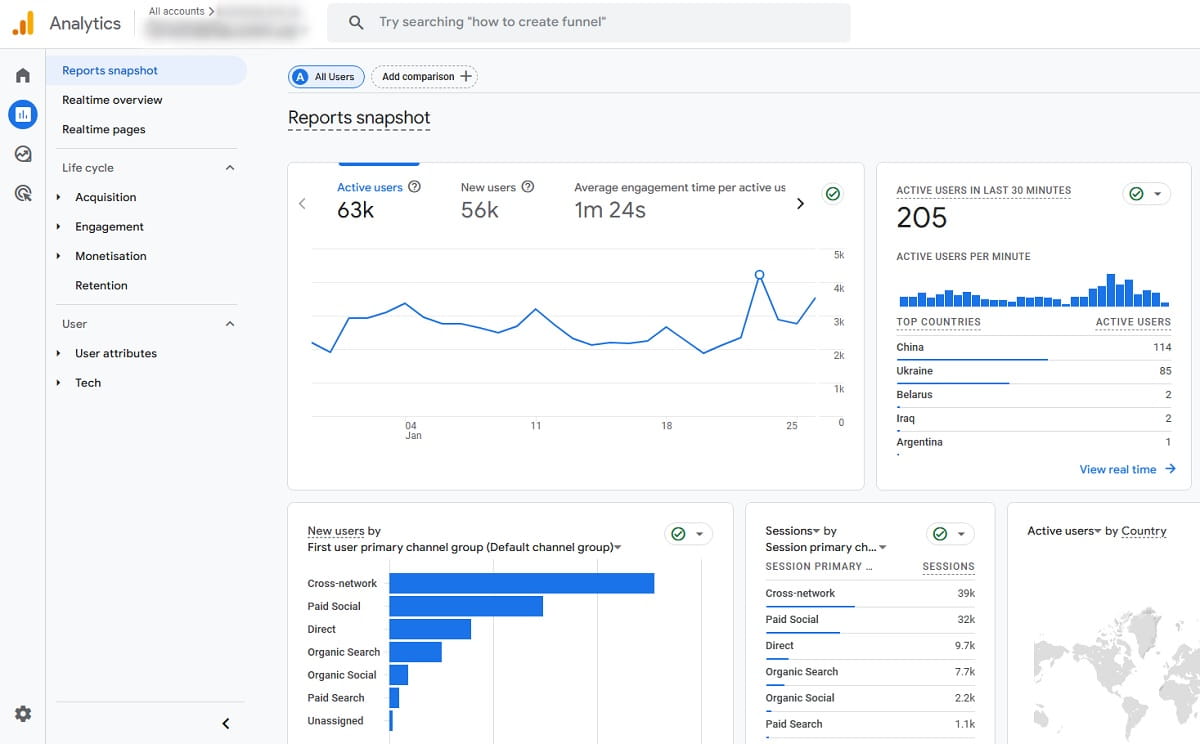
GA4 conversion tracking now uses the term key event for an event important to the business. A Google Ads conversion can be created from a GA4 key event for reporting and bidding, as explained in Google’s key event overview. Alternatively, Google Ads conversion tracking can use a native Google Ads tag. Choose deliberately and avoid sending the same business action twice as separate primary conversions.
Where appropriate, enhanced conversions can supplement an existing Google Ads conversion by using hashed, user-provided first-party data. This feature does not replace the underlying event, consent implementation, or source-of-truth reconciliation.
How To Track Conversion Value And Revenue
Revenue tracking requires more than a purchase count. Send the actual transaction value, currency, unique transaction ID, and item details where supported. Keep one documented definition of revenue: gross merchandise value, net sales, recognized recurring revenue, or another agreed metric.
Google’s event specification notes that transaction_id helps prevent duplicate purchase events. Use the same stable order ID across relevant systems, but never expose sensitive payment data.
| Field | Purpose | Common failure |
|---|---|---|
| Transaction ID | Deduplication and reconciliation | Missing, random on every reload, or reused across orders |
| Value | Revenue, ROAS, value-based optimization | Hard-coded value or string formatting error |
| Currency | Correct monetary interpretation | Missing or inconsistent ISO currency code |
| Items | Product-level analysis | Wrong SKU, price, quantity, or array format |
| Tax and shipping | Consistent revenue definition | Included in one system but excluded in another |
| Refund status | Net performance analysis | Revenue never adjusted for cancellations or refunds |
For lead generation, use a defensible value model. You can pass actual closed revenue later through offline conversion tracking, or use an expected value based on verified stage-to-sale rates. For example, if a qualified lead closes 20% of the time with $2,000 average revenue, its expected revenue is $400 before margin adjustments. Recalculate the model as sales quality changes.
Plerdy users implementing store-level measurement can follow the separate installation guide for adding an ecommerce tracking code and then validate transactions against the store backend.
Conversion Tracking Is Not the Same As Conversion Attribution
Tracking records that an event happened. Conversion attribution assigns credit for that event to marketing touchpoints. Marketing attribution is therefore a modeling layer on top of collected outcomes. A perfectly recorded purchase can still receive different channel credit in different platforms because each uses its own identity signals, attribution model, lookback window, time zone, eligible interactions, and reporting logic.
GA4 defines attribution as assigning credit to ads, clicks, and other factors along the path to a meaningful action. Its attribution documentation is a useful reminder that attribution is a model applied after event collection—not an objective replay of one universally knowable journey.
| Question | Tracking answers | Attribution answers |
|---|---|---|
| Did a purchase occur? | Yes, event and backend order exist | Not applicable |
| How much was it worth? | Value, currency, order status | How value is distributed across touchpoints |
| Which campaign gets credit? | Campaign metadata may be captured | A model applies credit and lookback rules |
| Why do reports differ? | Check collection and data quality | Compare models, windows, identities, and scope |
Choose a reporting source for each decision. Use the backend or CRM for actual orders and recognized revenue, analytics for journeys and cross-channel analysis, and ad platforms for campaign optimization within their own ecosystems. Do not add every platform’s attributed conversions together.
Connect Conversion Events With Funnels And User Behavior
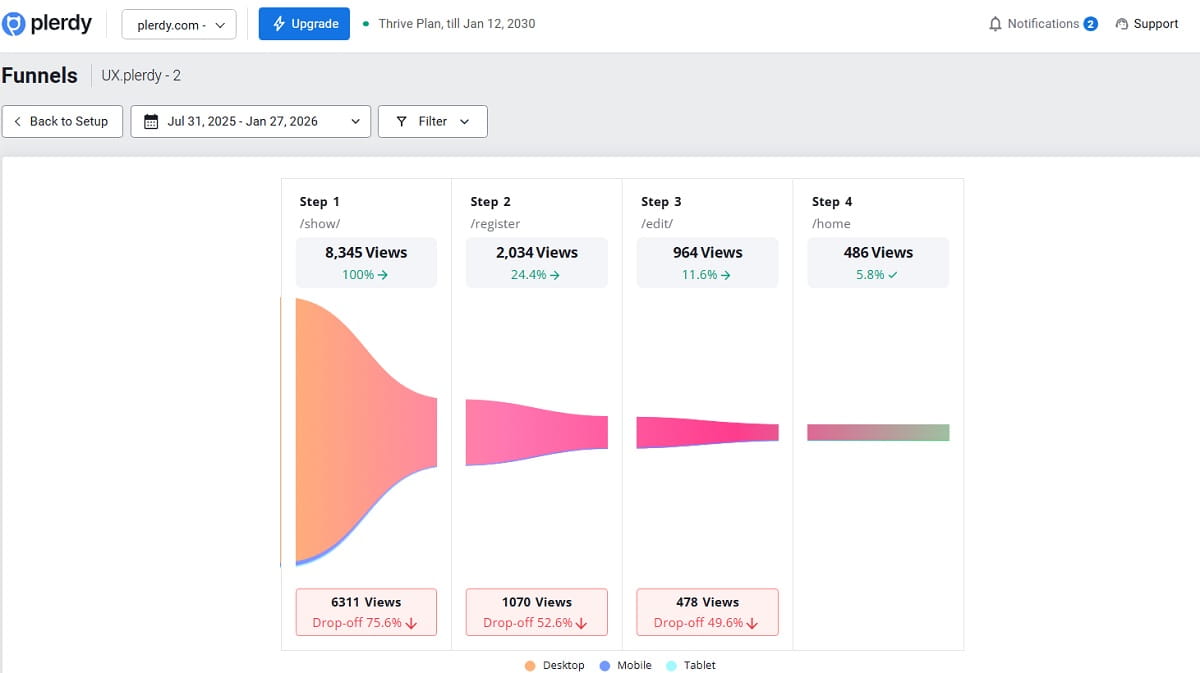
A conversion count tells you who reached the outcome. It does not explain why others failed. Build a conversion funnel from meaningful events, then segment by device, landing page, campaign, product, geography, new versus returning visitor, and other relevant dimensions.
| Signal | Possible interpretation | Behavioral check | Potential action |
|---|---|---|---|
| High CTA clicks, low form starts | Landing or modal fails to open correctly | Watch sessions with CTA event; check dead clicks and errors | Fix interaction and retest |
| High form starts, low valid submissions | Form friction or validation issue | Review field interactions, errors, mobile recordings | Clarify fields or repair validation |
| High checkout starts, low purchases | Unexpected cost, payment error, trust issue | Segment exits by step, device, payment method | Fix the specific abandonment cause |
| Campaign has leads but no qualified opportunities | Optimization target is too shallow | Compare landing behavior and CRM outcome by campaign | Import qualified outcomes and refine targeting |
Use Plerdy Event Tracking to monitor specific website actions, heatmaps to evaluate clicks and scrolling, and session recordings to inspect the actual journeys behind conversion and abandonment patterns. The broader guide to tracking user behavior on a website explains how these methods complement event data.
Conversion Tracking QA Checklist
Test in a staging environment when possible, then run controlled production tests. Keep test identifiers so they can be excluded from business reporting.
| Test | Expected result |
|---|---|
| Successful conversion | One event fires after confirmed success |
| Button click without success | No macro conversion fires |
| Page refresh or history navigation | Purchase or lead is not counted again |
| Transaction parameters | ID, value, currency, and items match the backend |
| Mobile and desktop | Same business definition works across layouts |
| Cross-domain journey | Session and campaign context survive approved transitions |
| Consent accepted, rejected, changed | Tags behave according to the implemented policy and platform requirements |
| Payment failure, cancellation, duplicate callback | No false or duplicate purchase is recorded |
| Ad and analytics destinations | Event appears with correct primary/secondary and counting settings |
| Backend reconciliation | Differences fall within an understood and documented range |
For Google implementations, use browser developer tools, Tag Manager Preview, Google Tag Assistant, GA4 DebugView or Realtime, and the conversion-action diagnostics in Google Ads. Validate downstream reports again after normal processing delays.
Why Conversion Numbers Do Not Match
Perfect equality between platforms is not a realistic default because they answer different questions. Large or sudden gaps, however, require investigation.
| Cause | What to compare | Likely fix |
|---|---|---|
| Different attribution models | Data-driven, paid last click, session scope | Compare equivalent scopes; document reporting source |
| Different lookback windows | Click-through and view-through periods | Align where possible; explain remaining difference |
| Different counting settings | Every conversion vs. one per interaction | Match the rule to purchase or lead behavior |
| Duplicate implementation | Native integration, GTM, plugin, hard-coded tag | Choose one controlled route or deduplicate |
| Wrong trigger | Click vs. successful submission or payment | Fire on confirmed outcome |
| Consent and browser limits | Observed, consented, modeled, or blocked events | Implement consent correctly; interpret modeled data |
| Cross-domain loss | Self-referrals, new sessions, missing click IDs | Correct domain linking and referral configuration |
| Time zone or processing delay | Account settings and reporting freshness | Compare settled data in the same time zone |
| Refunds and invalid leads | Raw conversion vs. accepted business outcome | Return later lifecycle events to reporting |
Start reconciliation from the source of truth. For purchases, compare unique transaction IDs and statuses with the order system. For leads, compare lead IDs with the CRM and separate received, valid, qualified, won, and refunded outcomes.
Conversion Tracking Tools And Software
No single conversion tracking software product should be expected to collect events, validate revenue, assign neutral attribution, explain UX problems, manage consent, and optimize every advertising platform. Choose a stack by responsibility.
| Category | Examples | Primary job |
|---|---|---|
| Behavior and CRO analytics | Plerdy | Events, funnels, heatmaps, recordings, ecommerce behavior, A/B testing |
| Web and product analytics | Google Analytics, Mixpanel, Amplitude | Event analysis, audiences, journeys, reporting |
| Tag management | Google Tag Manager, Tealium iQ | Tag deployment, triggers, variables, governance |
| Advertising conversion systems | Google Ads, Meta Pixel, Microsoft Advertising | Platform-specific measurement and bidding signals |
| CRM and revenue lifecycle | HubSpot, Salesforce | Lead qualification, pipeline, closed revenue, offline outcomes |
Evaluate event flexibility, dynamic value support, transaction deduplication, cross-domain and server-side options, CRM integration, consent controls, data export, debugging, retention, governance, implementation effort, and total cost. A conversion tracking tool is useful only if your team can maintain its definitions and test its data.
Track the Action—Then Understand the Behavior
Plerdy combines event and goal tracking with conversion funnels, heatmaps, session recordings, ecommerce analytics, and A/B testing. This allows teams to move from “the conversion rate dropped” to the pages, elements, segments, and sessions that explain the change.
Ten Common Conversion Tracking Mistakes
- Tracking a button click instead of confirmed success. Failed forms and declined payments become false conversions.
- Marking every micro conversion as primary. Bidding optimizes for abundant low-value behavior.
- Not passing dynamic value. A $20 and a $2,000 purchase appear equally valuable.
- Omitting transaction IDs. Reloads and multiple destinations create duplicate revenue.
- Using vague event names. Teams cannot distinguish form starts, submissions, qualified leads, and opportunities.
- Deploying the same tag through several routes. Plugins, GTM, native integrations, and hard-coded scripts overlap.
- Ignoring cross-domain journeys. Payment and scheduling domains break session and campaign context.
- Comparing platform totals without settings. Models, windows, counting rules, and time zones differ.
- Never reconciling with business records. A healthy tag dashboard can still report incorrect revenue.
- Collecting unnecessary data. More parameters increase privacy and governance risk without improving decisions.
Conversion Tracking FAQ
What Is Conversion Tracking?
Conversion tracking records valuable actions such as purchases, qualified leads, subscriptions, or bookings and connects them with the website journeys, campaigns, or channels that preceded them.
How Do I Track Conversions On a Website?
Define the business action, create a precise event and trigger, pass required parameters, send it to analytics or advertising destinations, test every success and failure path, and reconcile the resulting data with backend orders or CRM records.
What Is a Conversion Tracking Tag?
A conversion tracking tag is code that records or sends information when a defined action occurs. It may be deployed directly, through a tag manager, or alongside a server-side or platform integration.
What Is the Difference Between an Event And a Conversion?
An event records a user or system action. A conversion is an event designated as important to a business or advertising objective. Many events can support analysis without being treated as primary conversions.
Should I Use GA4 Or Google Ads Conversion Tracking?
GA4 supports cross-channel event and journey analysis, while Google Ads measures and optimizes outcomes associated with Google Ads. You can create Google Ads conversions from GA4 key events or use a native Ads tag. Choose one controlled primary route for each outcome and prevent duplication.
Why Are Conversions Different In GA4 And Google Ads?
The platforms may use different attribution models, scopes, lookback windows, counting rules, identities, time zones, processing delays, and consent modeling. Compare equivalent settings and reconcile both against the same backend or CRM records.
How Do I Track Ecommerce Revenue Accurately?
Fire the purchase event after confirmed success and send a stable transaction ID, actual value, currency, and item data. Prevent duplicates, exclude test orders, account for refunds, and reconcile tracked transactions with the ecommerce backend.
How Often Should Conversion Tracking Be Audited?
Monitor critical conversions continuously and perform a structured audit after website, checkout, consent, CRM, tag, or campaign changes. Reconcile important revenue and lead totals on a regular schedule appropriate to the business volume and risk.
Reliable Tracking Starts With a Business Definition
The best conversion tracking setup is not the one with the most pixels or events. It is the one that records a clearly defined outcome once, carries the right value and identifiers, respects consent, survives the full journey, reconciles with business records, and gives the team enough behavioral context to improve the experience.
Begin with one macro conversion and the few micro conversions needed to explain its funnel. Validate the data before using it for budgets or bidding. Then connect conversion measurement with user behavior so every report can lead to a testable action.